Community management
How to launch an online community for your association: the first 90 days
How to launch an association online community: deciding what it is for, what to do with your listserv, seeding discussions with founding members, answering every first post, guidelines, bringing members back by email, a 90-day plan, what to measure and common mistakes.
 Boopesh MahendranCo-founder, One Roof7 min read
Tap the picture to see it at full size.
In this article⌄
The first few months of a new community matter most. People who find it empty often do not come back, and with no one posting, there is nothing to bring them back. Robert Kraut and Paul Resnick, researchers who study online communities, call this “a critical mass problem.” They use the phrase in a 2010 draft of their book Building Successful Online Communities.
This guide covers what to decide before you start, seeding the community, the first replies, guidelines, bringing members back, a 90-day plan, what to measure and common mistakes.
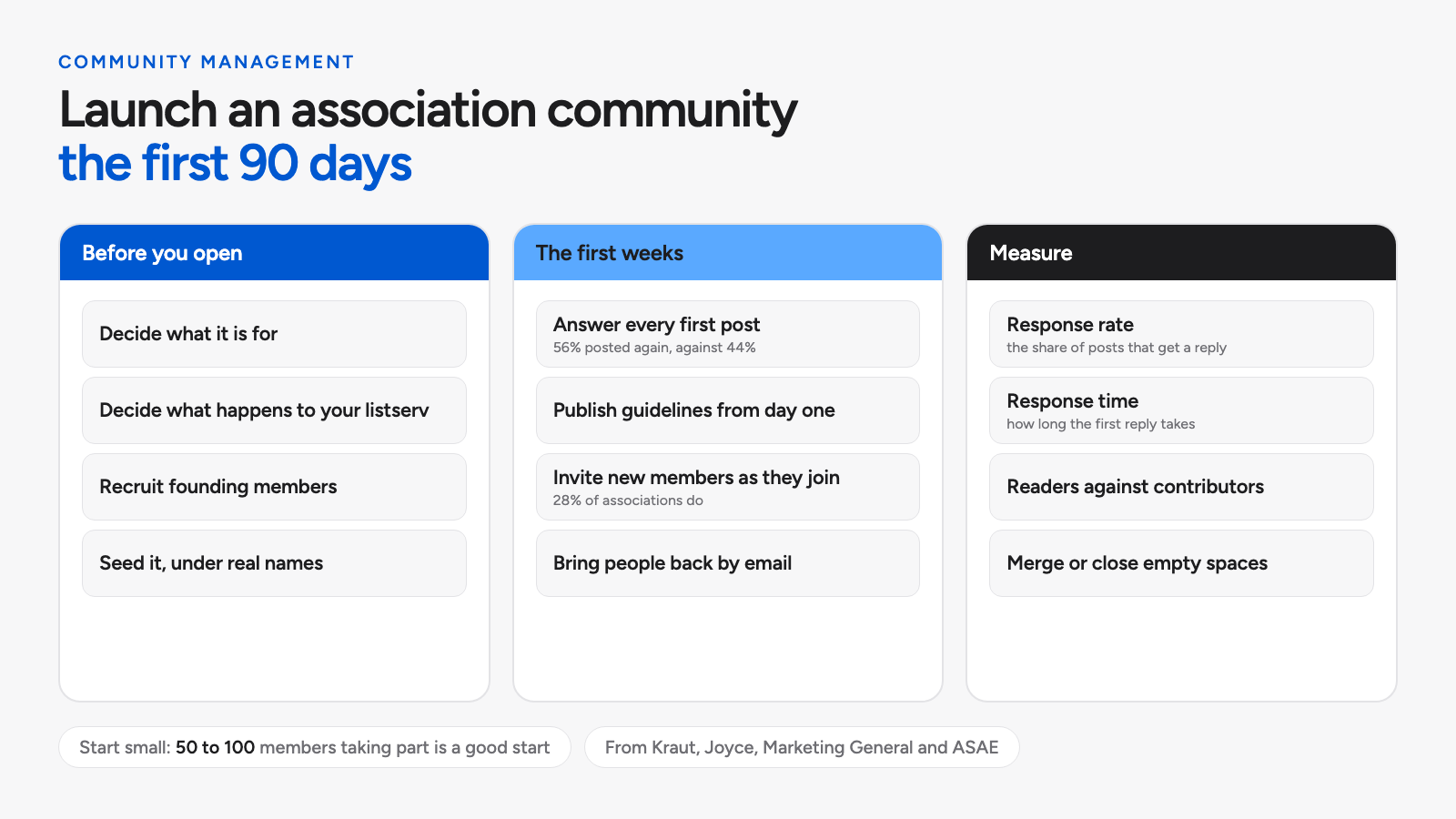
Decide what it is for
A community needs a reason to exist that members recognize. John Nawn, writing on ASAE’s site, warns that “too many platforms are launched without a clear strategy, sustainable staffing, or a plan to measure impact.”
Before you launch, write down:
- What members will get from it. For example, answers from peers, or a place for each chapter to organize.
- Who will run it, and how many hours a week they have. Our guide to the association community manager covers the role.
- What you will measure at 30, 60 and 90 days.
Decide what happens to your listserv
If members already talk on an email list, decide early whether it moves into the new community. Running a forum and a separate email list side by side can split members between them, so that neither gets busy enough.
Associations have gone both ways:
- The American Payroll Association (now PayrollOrg) moved its listserv into The Payroll Community in April 2023.
- The Ecological Society of America kept ECOLOG-L, its public email list with over 30,000 users, running alongside the new member community it opened in 2024.
If you move a listserv, members who reply by email should be able to keep doing so. Our guide to migrating an association community covers moving past discussions.
Seed it before you open
Nobody wants to post first in an empty room. Before you open the community to everyone:
- Recruit founding members. Nawn, in another article on ASAE’s site, advises associations to “identify champions to seed conversation and model behaviors.” Ask volunteers, committee members and members who already answer questions on your listserv or social media.
- Start discussions under real names. Staff and founding members should post as themselves.
- Ask easy questions. Lauren Kelly of ISTE suggests staff post simple questions that are “easy for almost anyone to be able to respond to.”
- Let founding members shape it. They can help write the guidelines and name the spaces.
Start small. Richard Millington, a community consultant, suggests that a small launch “is a success when you have 50 to 100 members participating in the community.”
Answer every first post
Replying to a newcomer’s first post is one of the most useful things you can do in the first weeks. In a study of 2,777 newcomers to six Usenet newsgroups:
- 61% of newcomers got a reply to their first post.
- Newcomers who got a reply were about 12 points more likely to post again: 56% against 44%, in the authors’ estimate.
- The tone of the reply, and whether it answered the question, did not change whether newcomers posted again. What mattered most was getting one.
A second study found newcomers were less likely to get a reply than people who had posted before. Posts in which the writer introduced themselves and their situation were about 10% more likely to get one. The authors suggest “greeters to welcome first-time posters.”
Following up after the welcome matters too. In The Community Roundtable’s 2017 research, communities with formal follow-up programs for new members had inactivity rates 15 to 20 points lower than those without.
Publish guidelines from day one
Set the rules before anyone breaks them. An article on ASAE’s site puts it plainly: “moderators are only effective if your organization creates clear and concise community guidelines.” Our community guidelines template is a starting point.
Invite members, and bring them back
- Invite new members as they join. In Marketing General’s 2024 benchmarking report, 28% of associations listed an invitation to join their online community among the ways they welcome new members. Slightly more, 31%, invited longer-standing members to join it.
- Bring in existing groups as a whole. When the Credit Union National Association (now America’s Credit Unions) combined two groups into one advocacy community, it enrolled all their members, about 1,300 people, from the start. It saw no large drop-off in the first week.
- Bring people back by email. In a study of a nutrition website, people logged on far more often on days they were sent an email, though the effect faded within two days. ISTE has put a round-up of popular discussions in its monthly newsletter.
A 90-day plan
Before launch:
- Decide the goal, who runs it, and what you will measure.
- Recruit founding members, and agree the guidelines with them.
- Set up a few spaces, not many, and seed each with real discussions.
Days 1 to 30:
- Open to founding members first, then invite others in small groups.
- Reply to every first post, and welcome every new member by name.
- Invite each new member as they join the association.
Days 31 to 60:
- Start one discussion a week with a question members care about.
- Feature the best discussions in your newsletter or email digest.
- Ask founding members to answer questions that have no reply.
Days 61 to 90:
- Review what you measured, and report it.
- Merge or close spaces that nobody uses.
- Decide what to change for the next quarter.
What to measure
A 2023 guest post on The Community Roundtable’s blog suggests tracking:
- Response rate: the share of posts that get a reply.
- Response time: how long the first reply takes.
- Readers and contributors: how many read, and how many post.
Expect most members to read rather than post. The Nielsen Norman Group’s 90-9-1 rule holds that “90% of users are lurkers.” Track whether more members post each month, not whether most do.
Common mistakes
- Launching big, with nothing behind it. Millington describes a brand community that over 10,000 people joined. When he first met the team, about three months after launch, fewer than 50 had been active in the previous week.
- Too many spaces. Each space needs enough members to stay busy. Start with a few, and add more when one gets crowded.
- Leaving first posts unanswered. See the studies above.
- No one in charge. A community without staff time, or a plan to measure it, often stalls.
Where One Roof helps
One Roof is built to give a new community a strong start:
- Questions waiting for an answer are shown on members’ home page, where they are easy to spot and answer.
- New members are guided through four first steps: saying who they are, following two spaces, introducing themselves and connecting with three members. An optional welcome email series covers their first week.
- Community guidelines are shown to members, who agree to them with their first post.
- Email digests bring members what they missed, daily, weekly or monthly, as each chooses. Members can reply to a discussion by email, once that is set up.
- Discussions suggest earlier answers while a member types a question, so a young community does not fill with repeats.
If your community already exists but has gone quiet, see our guide to reviving a quiet association community.
Questions about launching an association online community
How long does it take to launch an online community?
Plan for a few weeks of preparation before you open, and 90 days of active work afterwards. The first three months set the pattern, so plan for the most work then.
How many members do you need before you launch?
You do not need many. One consultant’s rule of thumb is that 50 to 100 members taking part makes a successful small launch. Start with founding members and grow from there.
Should we keep our listserv when we launch a community?
Running both can split members between them. Some associations move their listserv into the community, while others keep it running alongside. Whichever you choose, let members who like email keep replying by email.
How do you get members to post in a new community?
Seed discussions before you open, ask easy questions, and reply to every first post. Newcomers who get a reply are more likely to post again.
What should we measure in the first 90 days?
The share of posts that get a reply, how quickly the first reply comes, and how many members post as well as read.