Email and notifications
Members stay in touch by email and choose how much they get.
- Daily, weekly or monthly digests
- Reply to a discussion by email
- Each member chooses what they get

The community comes to the member
A digest brings members what is new in the spaces and topics they follow, as often as they choose.
Members control what they get
For each kind of notification, a member chooses the app, an email, the digest, or nothing. People who control their email are less likely to unsubscribe from all of it.
Staff can reach the right members
Send an announcement to all members, paying members, free members, or the followers of one space. You see how many people will receive it before you send.
Step by step
How it works
Something happens in the community, and each member hears about it in the way they chose.
Step 1
Something happens
A reply, a mention, a new post in a space they follow, an event reminder.
Step 2
The member’s settings decide
In the app, by email straight away, saved for the digest, or not at all.
Step 3
The digest goes out
Daily, weekly or monthly, with what they missed and a few discussions picked for them.
Step 4
They reply or click through
One click opens the discussion. Where reply by email is set up, replying to the email is enough.
For members
Each member chooses what they hear about
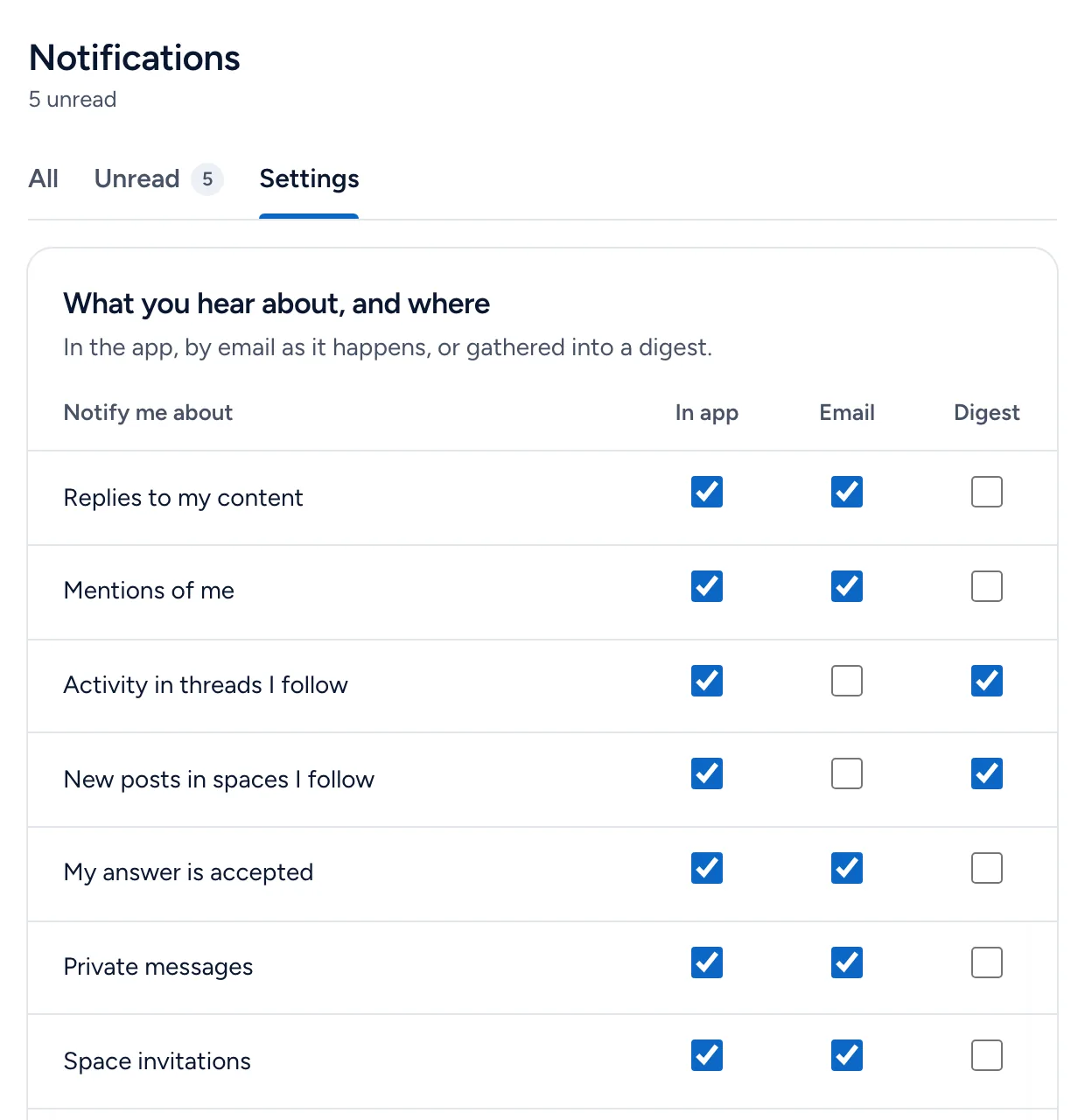
There are fifteen kinds of notification, from replies and mentions to event reminders and announcements. For each one, a member chooses whether to see it in the app, get an email, or have it saved for the digest. Every email has a link to change these settings or to stop all email in one click.
- In the app, by email or in the digest, for each kind
- Follow a space for all posts, or questions only
- One click to unsubscribe, in every email
For your staff
Ready-made messages for key moments
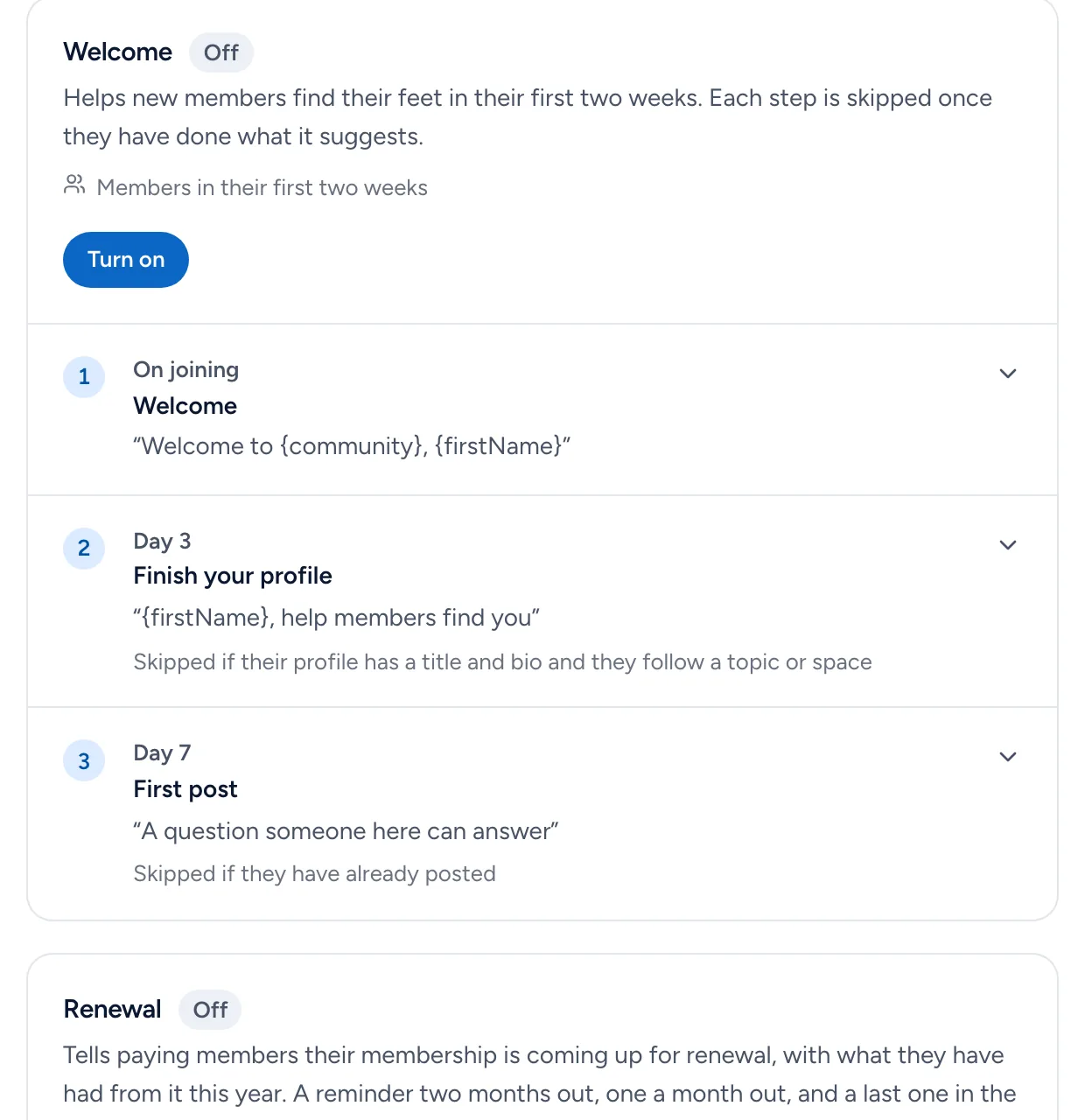
Four sets of automatic messages are ready to use: a welcome for new members, reminders before renewal, reminders about recertification credit, and a message to members who have gone quiet. You can edit the subject and opening line of each, preview it, and send yourself a test. Each one is off until you switch it on.
- Welcome, renewal, credit reminder and win-back
- Edit the wording, preview it, and send a test
- See how many were sent and clicked, and how many achieved their aim
Reply by email
Take part without opening the site
When reply by email is set up, a member can answer a discussion or a private message by replying to the email. The reply is posted under their name, and goes through the same moderation as any other post. Old quoted text and signatures are removed.
- Reply to a discussion or a private message
- Start a new discussion by email to a space
- Only accepted from the member’s own address
See it with your own association’s name on it
We set up a demo for you and answer your questions. Or open the live demo and look around on your own.
In detail
What is included
For members
Notifications
There are fifteen kinds, and each can go to the app, email or the digest.
Digest
Each member chooses daily, weekly, monthly or never.
Picked for you
AI chooses up to three discussions to match the member’s work.
Reply by email
Answer a discussion or message from the inbox, once set up.
For your staff
Announcements
Send to all members, paying members, free members, or one space’s followers.
Automatic messages
Welcome, renewal, credit and win-back messages are each switched on by you.
Your brand
Every email carries your logo, name and colour.
Email log
The log records email received from members and what happened to it.
How it differs from a mailing list
Because a mailing list sends everything to everyone, members switch off or leave.
What a member gets
A mailing list
Every message, as it is sent
One Roof
Only what they follow, as often as they choose
Replying
A mailing list
Goes to the whole list
One Roof
Posted in the discussion, under their name
Stopping it
A mailing list
Unsubscribe from everything
One Roof
Turn off one kind, or everything, in one click
New members
A mailing list
Start with an empty inbox
One Roof
An optional welcome over their first week
Announcements
A mailing list
To the whole list
One Roof
To all, paying, free, or one space’s followers
Questions
What teams ask about it
How often is the digest sent?
Each member chooses daily, weekly, monthly or never. It contains what they have not yet seen from the things they follow, and up to three discussions picked for them. No email goes out when there is nothing to send.
Can members reply by email?
Yes, once it is set up. It needs an address for incoming mail with your email provider, which we set up with you during onboarding. Replies are accepted only from the member’s own address, and attachments are not kept.
Can we build our own automatic email sequences?
Not from scratch. There are four ready-made sets:
- Welcome
- Renewal
- Credit reminder
- Win-back
You can edit the subject and opening line of each message and switch each one on or off. There is no drag-and-drop builder.
Will members get too much email?
Each member controls every kind of notification. Automatic messages are limited to one every three days for each member, and members can turn them off.
Which email service does it use?
Any provider that offers standard SMTP sending. We connect yours during onboarding, so email comes from your own address.
Are there mobile push notifications?
Not yet. Members are told in the app and by email, whether they use it in a browser or installed on their phone.