Chapters and committees
Every chapter and committee gets its own space, members list, events and volunteers.
- A private space for each group
- Volunteer openings and applications
- Terms that end when they should

Every group inside one community
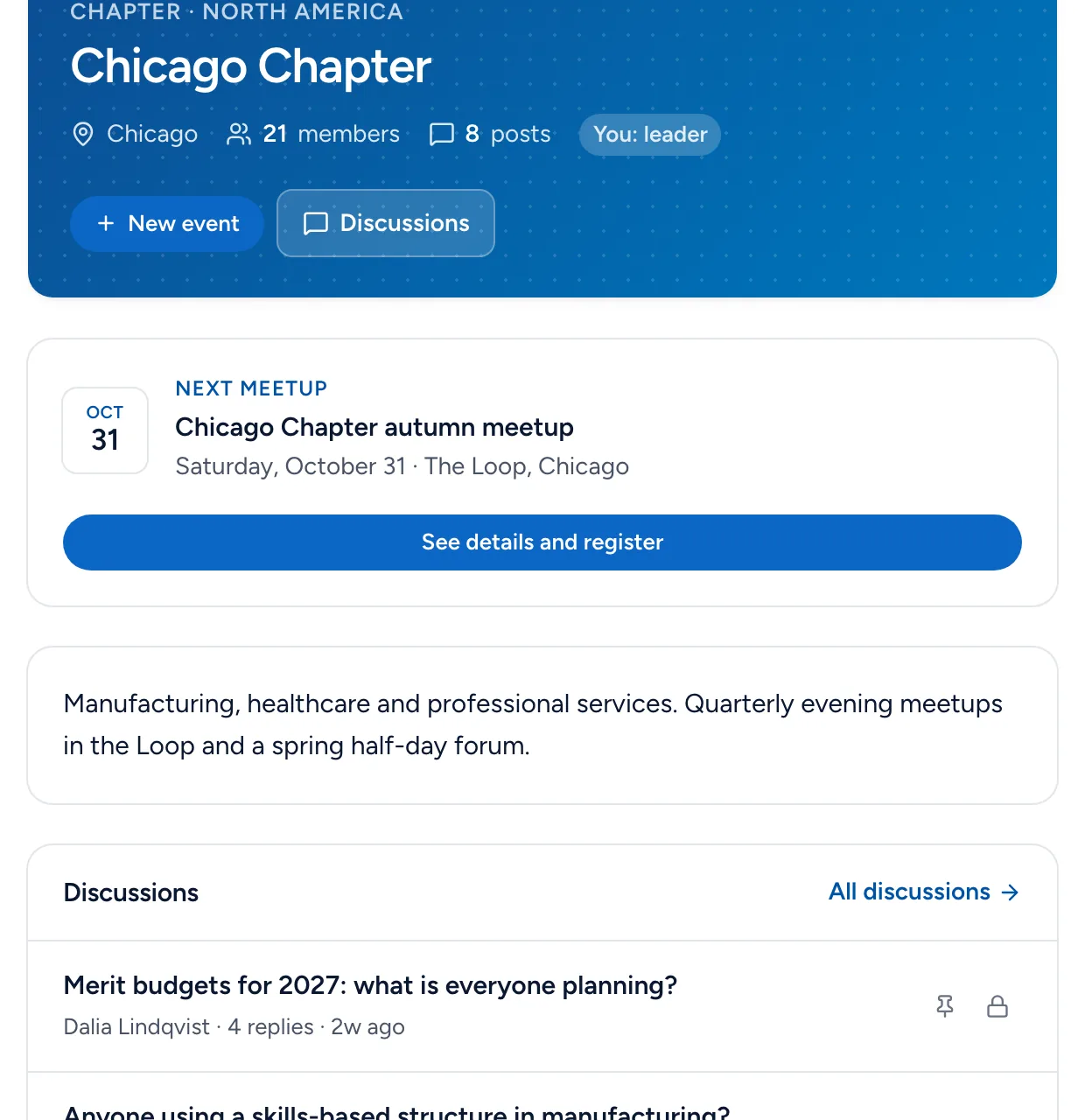
Each chapter and committee has its own space inside the main community, with its discussions, events and people. There is no separate site to run.
Find volunteers more easily
Post an opening and say what it involves. Members who fit are shown it and apply with a note. The group’s leaders decide, and nobody has to manage it by email.
Terms end on time
A role with a term is flagged before it ends. When the term is over the role is removed, and last year’s committee members lose access to the committee’s private space.
For leaders
Leaders run their own group
A chair does not need staff to pin a notice, set up a meeting or add a committee member. Leaders manage the members list, events and discussions of their own group and of no other.
- Pin or lock a discussion in their own space
- Create events for the group
- Add, remove and assign roles on the members list
Volunteering
Volunteer openings shown to the right members
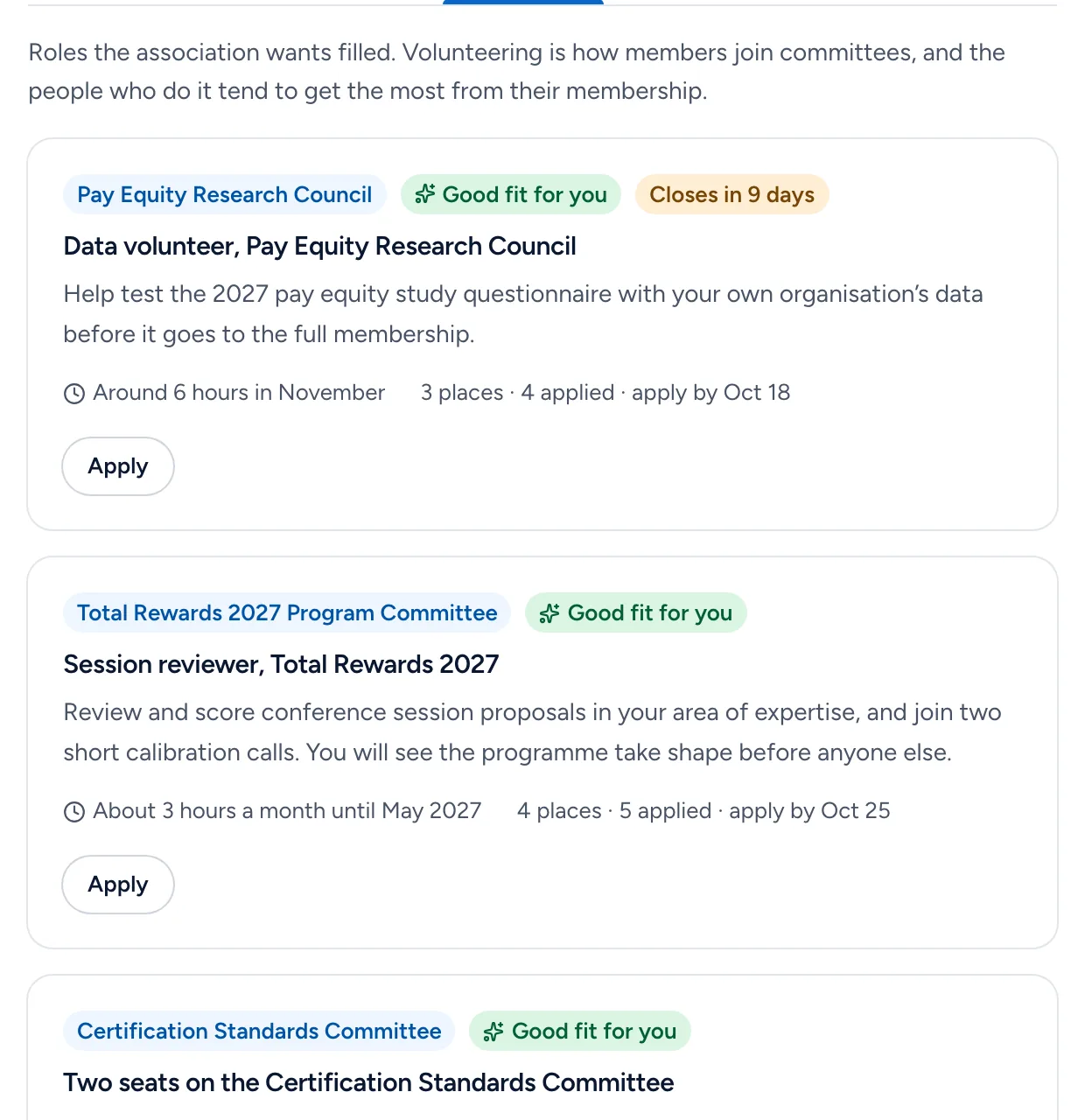
Every opening across the association is listed in one place, and each member sees the ones that match their expertise first. An application goes to the group’s leaders with the member’s note.
- Role, commitment, places and closing date
- Suggested to members whose expertise fits
- Applications waiting, counted for staff
See it with your own association’s name on it
We set up a demo for you and answer your questions. Or open the live demo and look around on your own.
Step by step
How it works
Once a group is set up, its leaders run it from there.
- 1
Create the group
A chapter or a committee, open for any member to join or private to its members.
- 2
Name its leaders
Chairs and other roles, each with a term if it has one. Leaders can pin and lock discussions and set up events.
- 3
Post an opening
What the role is, the time it takes, how many places and when applications close.
- 4
Leaders decide on each application
An accepted member joins the members list with the role, and the other applicants are told.
How it differs from mailing lists
Chapters and committees usually run on a mailing list, a shared folder and someone’s spreadsheet of who is in which group.
Who is on the committee
Mailing lists and spreadsheets
A spreadsheet, out of date by spring
One Roof
A members list with roles and term dates
When a term ends
Mailing lists and spreadsheets
Access stays until someone remembers
One Roof
The role ends on the day, after a reminder
Finding volunteers
Mailing lists and spreadsheets
A call in the newsletter
One Roof
Openings shown to the members who fit
Running the group
Mailing lists and spreadsheets
Staff do it for them
One Roof
Leaders manage their own space, members list and events
What staff can see
Mailing lists and spreadsheets
Whatever each chair reports
One Roof
Every group and every application waiting
In detail
What is included
Each group
Open or private
Any member may join an open group. Only its members can see a private one.
Members and roles
You record who belongs, who leads, and when each term ends.
Its own events
The group’s leaders set up its meetings and events.
Its own discussions
The people who lead it can pin notices and lock threads.
Across the association
Volunteer openings
Every opening is on one list, with the ones that fit each member first.
Applications
A member applies with a note, and the group’s leaders accept or decline.
Term reminders
Leaders and staff are told before a term ends, and the role is removed when it does.
An overview for staff
Staff see every group, its leaders, and applications waiting for a decision.
Questions
What teams ask about it
What is the difference between a chapter and a committee here?
Both are groups with a space, a members list and leaders. A chapter is usually open for members in a region to join, while a committee is usually private to the people appointed to it. You choose for each group.
Can a committee’s discussions be kept private?
Yes. A private group’s space is seen only by its members and is never listed to anyone else.
What can a group’s leader do?
Within their own group, a leader can:
- Manage the members list and roles
- Pin or lock discussions
- Create events
- Post volunteer openings
- Decide on applications
They cannot change anything outside it.
What happens when a term ends?
The leader and staff are reminded beforehand. On the day the term ends, the role is removed, along with the access that came with it.
How do members find a volunteer role?
All open roles are listed in one place, with the ones that match a member’s expertise shown first. A member applies with a short note.
Can members lists come from our membership system?
Yes. Committee and chapter members lists can be kept up to date from your membership system as part of the connection set up during onboarding.