Mentoring
Mentoring in your community that matches people and sends the reminders.
- Part of the community
- Meetings arranged in a few clicks
- Results recorded

Step by step
How it works
Members choose a mentor and arrange their meetings. One Roof handles the reminders and follow-up.
Step 1
Members say what they offer or need
A short profile: the subjects, how many mentees they can take, and whether they would rather be matched outside their own employer.
Step 2
Mentors are suggested
A member looking for a mentor sees who fits and the reason. Other mentors can be searched and filtered.
Step 3
The member sends a request
The member writes what they want to learn. The mentor accepts or declines, and is reminded if they forget.
Step 4
They meet and report how it went
One offers a few times and the other picks one. Both are reminded the day before and asked afterwards whether it happened. At the end, both say whether it was useful.
Members find the right mentor
Each member looking for a mentor is shown suggested mentors with the reason for each: a shared subject or a different employer. Staff do not have to match people by hand.
Requests do not go unanswered
A mentor who has not answered a request after a week is reminded, and after three weeks the request is closed. A pair that has gone quiet is asked how it is going.
You can show the results
Each meeting is recorded once the pair say it happened, and at the end both say whether it was useful. This gives staff numbers to show for the programme.
For the pair
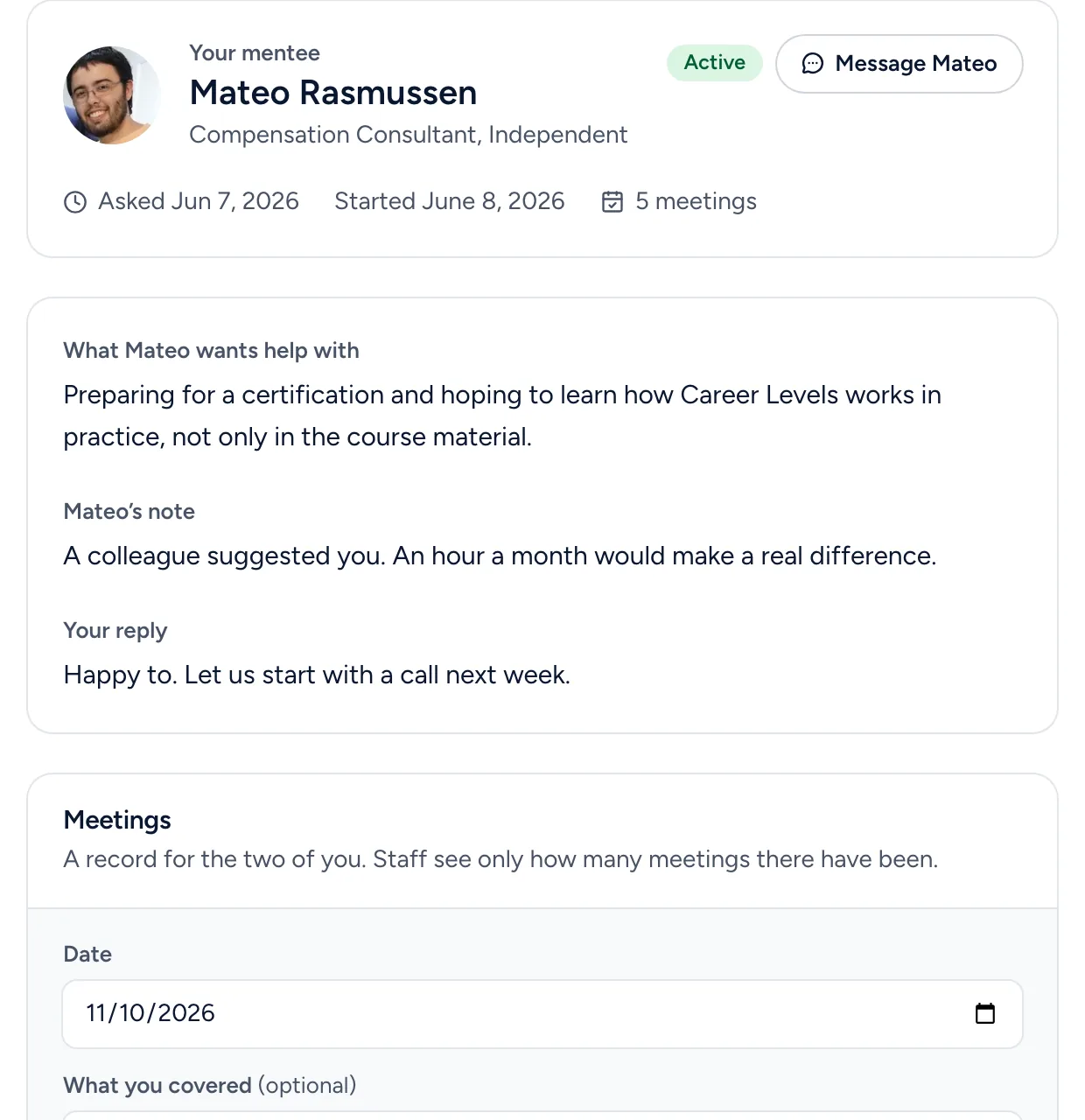
A shared page for each mentor and mentee
Each mentorship has a page that the mentor and mentee share. It shows the goal they started with, the next meeting with its link, every meeting held, and a note of what was agreed. Times offered show in each person’s own time zone.
- The goal the mentee set, in their words
- The next meeting, with a join button and a calendar invite
- Meetings by date, with a note
For your staff
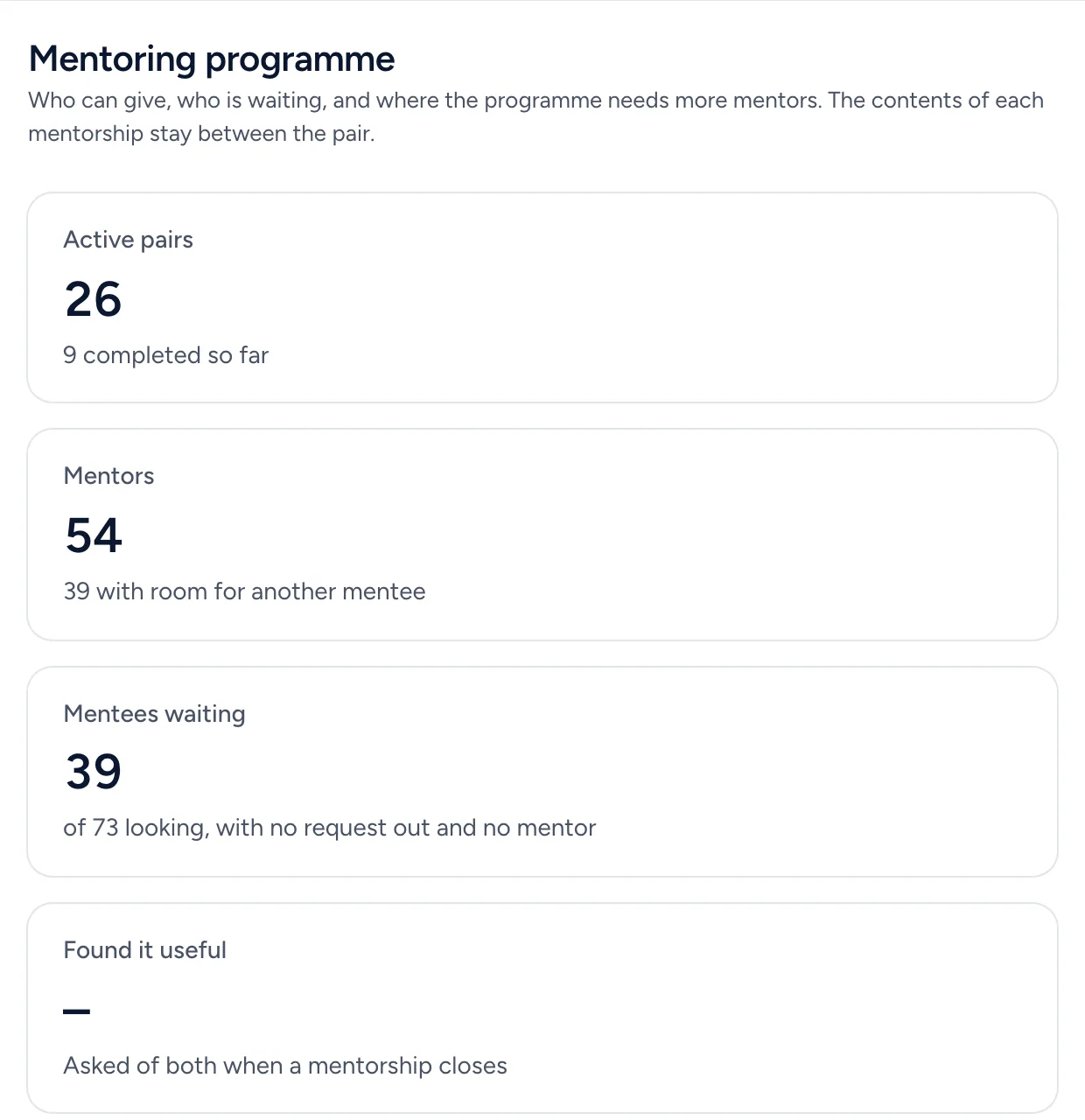
The whole programme at a glance
Staff see how many pairs are active, which requests have waited too long, and what mentors and mentees said at the end. Staff can send a reminder for a request that has waited over a week, or close it, from the same page.
- Requests waiting, with how long
- Remind the mentor, or close an old request, in one step
- Whether pairs found it useful, counted
See it with your own association’s name on it
We set up a demo for you and answer your questions. Or open the live demo and look around on your own.
How it differs from a form and a spreadsheet
Most association mentoring runs on a sign-up form, a spreadsheet and a volunteer’s spare time. Here is what changes.
Matching
A form and a spreadsheet
Staff or a volunteer pair people by hand
One Roof mentoring
Members are shown who fits, with the reason, and ask for themselves
A request nobody answers
A form and a spreadsheet
Sits until someone notices
One Roof mentoring
The mentor is reminded after a week, the request is closed after three, and the member is told
Finding a time
A form and a spreadsheet
Emails back and forth
One Roof mentoring
One offers a few times, the other picks one, and both get a calendar invite
Whether pairs are meeting
A form and a spreadsheet
Unknown until the end-of-year survey
One Roof mentoring
Meetings recorded as they happen, and a quiet pair asked how it is going
Where it happens
A form and a spreadsheet
A separate tool, with its own login
One Roof mentoring
In the community members already use
What you can report
A form and a spreadsheet
How many signed up
One Roof mentoring
Pairs active, meetings held, and whether each found it useful
In detail
What is included
For members
A mentoring profile
Offer mentoring, look for it, or both, with the subjects and a few lines on what you can help with.
A mentor directory
Members search it by subject, and those looking for a mentor see suggestions first.
Requests
Ask with a goal, accept or decline with a note, or withdraw.
Meetings
Offer a few times, the other picks one, and it goes into Outlook or Google Calendar with your own Zoom, Teams or Meet link.
Done for you
Reminders
A mentor is reminded of an unanswered request after a week, and the pair the day before each meeting.
Capacity and pausing
A mentor at their limit, or paused, is not offered to anyone new.
Blocks respected
A member who has blocked another is never shown to them as a mentor.
Outcomes
At the end, each of the pair records what was achieved and whether they found it useful.
Questions
What teams ask about it
How are mentors matched to members?
A member looking for a mentor is shown mentors who fit what they want to learn, with the reason for each. Members can prefer a mentor outside their own employer. Nobody is assigned. Members choose and ask.
Can a member ask more than one mentor?
Yes. A member can have up to three requests waiting at once, each to a different mentor. Each request is sent separately, with its own note to that mentor; there is no way to send one message to several mentors. When a request is answered, withdrawn or closed, the member can ask someone else.
What happens if a mentor does not respond?
They are reminded once after a week. After three weeks the request is closed, the member is told, and they are free to ask someone else.
Can a mentor limit how many mentees they take?
Yes. Each mentor sets a number, and can pause. A mentor at their limit or paused is not offered to new members.
Can staff step in?
Community managers see every request and pair. They can remind a mentor of a waiting request or close it, and each of these actions is recorded in the audit log.
How do a mentor and mentee arrange to meet?
Either of them offers up to three times on their shared page, and the other picks one. Each sees the times in their own time zone. The meeting goes into Outlook, Google or any other calendar, both are reminded the day before, and afterwards either says whether it happened, which records it for both.
Is there video calling?
Pairs use the video tool they already have. Whoever offers the times adds their own Zoom, Teams or Google Meet link, and it goes into the calendar invite and the reminder, with a join button on the page.
How do we know the programme is working?
Meetings are recorded as they happen, and when a mentorship ends the mentor and the mentee each say whether it was useful. Staff see the counts, and how many meetings are arranged ahead, never what they are about.
Is it a separate product?
No. It is part of the community and uses the same sign-in, profiles and notifications. There is nothing extra to buy.