Recertification credit
Track continuing education credit automatically and show members their progress.
- A programme for each credential
- Awarded automatically
- An export for your records

No spreadsheet needed
When you mark who attended an event, each of them gets its credit towards every credential they hold. Nobody types it into a tracker. Members do not need to email to ask where their credit is.
Members can see their progress
Each member sees the credit they have earned this cycle, how much their credential requires, and what earned each credit. They no longer need to ask “how many do I have?”
A clear record for audits
Every credit has a reason and a date, and the whole record can be downloaded as a file. A limit per cycle means community contributions cannot replace real learning.
For members
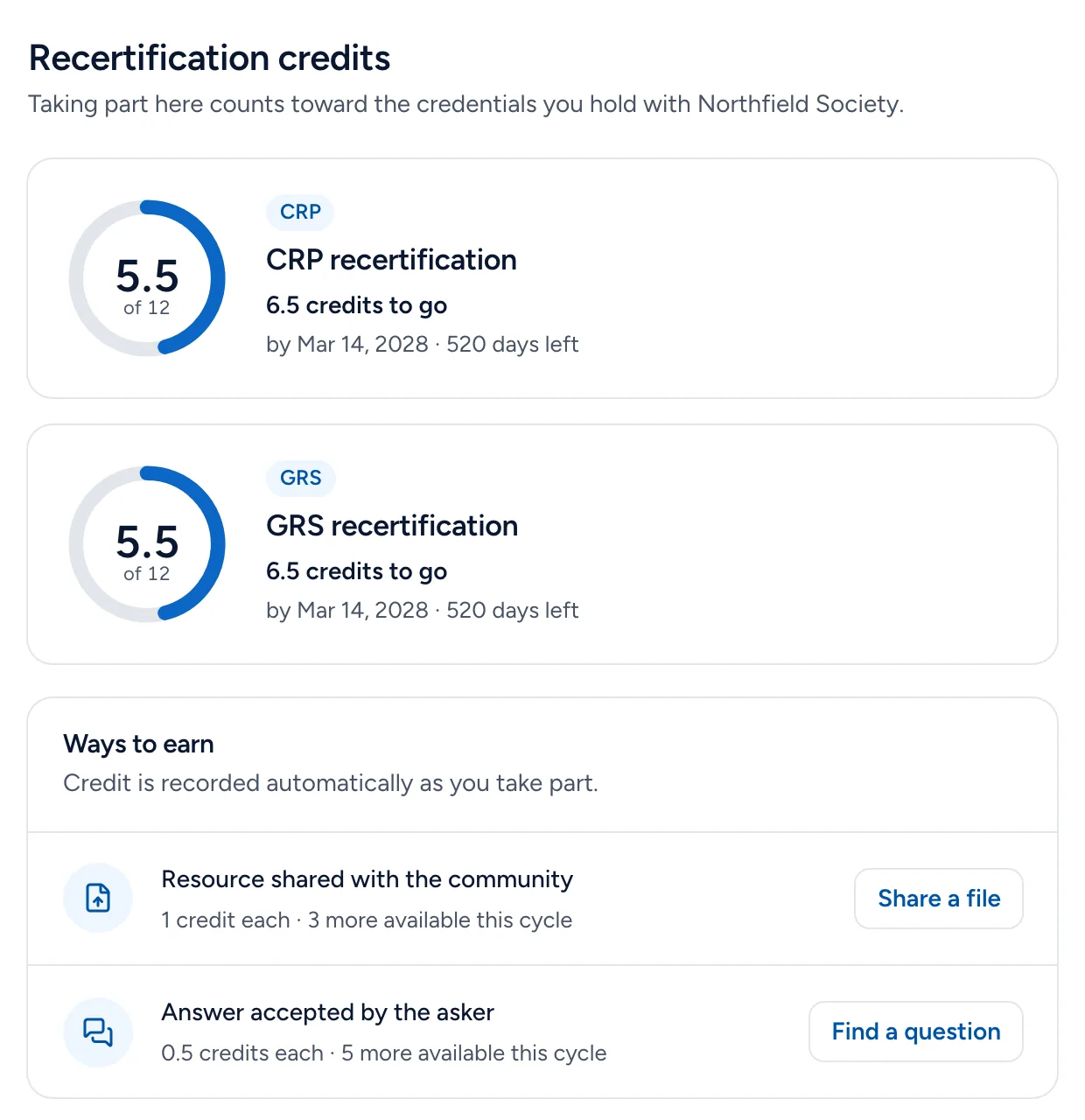
Members always see their progress
A member sees how much credit they have this cycle and how much their credential requires. Each credit shows what earned it, whether an event, a webinar or an answer a colleague accepted.
- Credit this cycle, against the requirement
- What each credit was earned for, and when
- More than one credential, each with its own count
For your staff
Programmes that follow your rules
Each credential is a programme with its own cycle and requirement, set up with you during onboarding. Each member’s cycle starts from the date they joined. Contributions earn credit up to a limit per cycle, so nobody can recertify on forum posts alone.
- A cycle length and requirement for each credential
- Each member’s cycle counted from their own joining date
- Credit for contributions, with a limit per cycle
Oversight
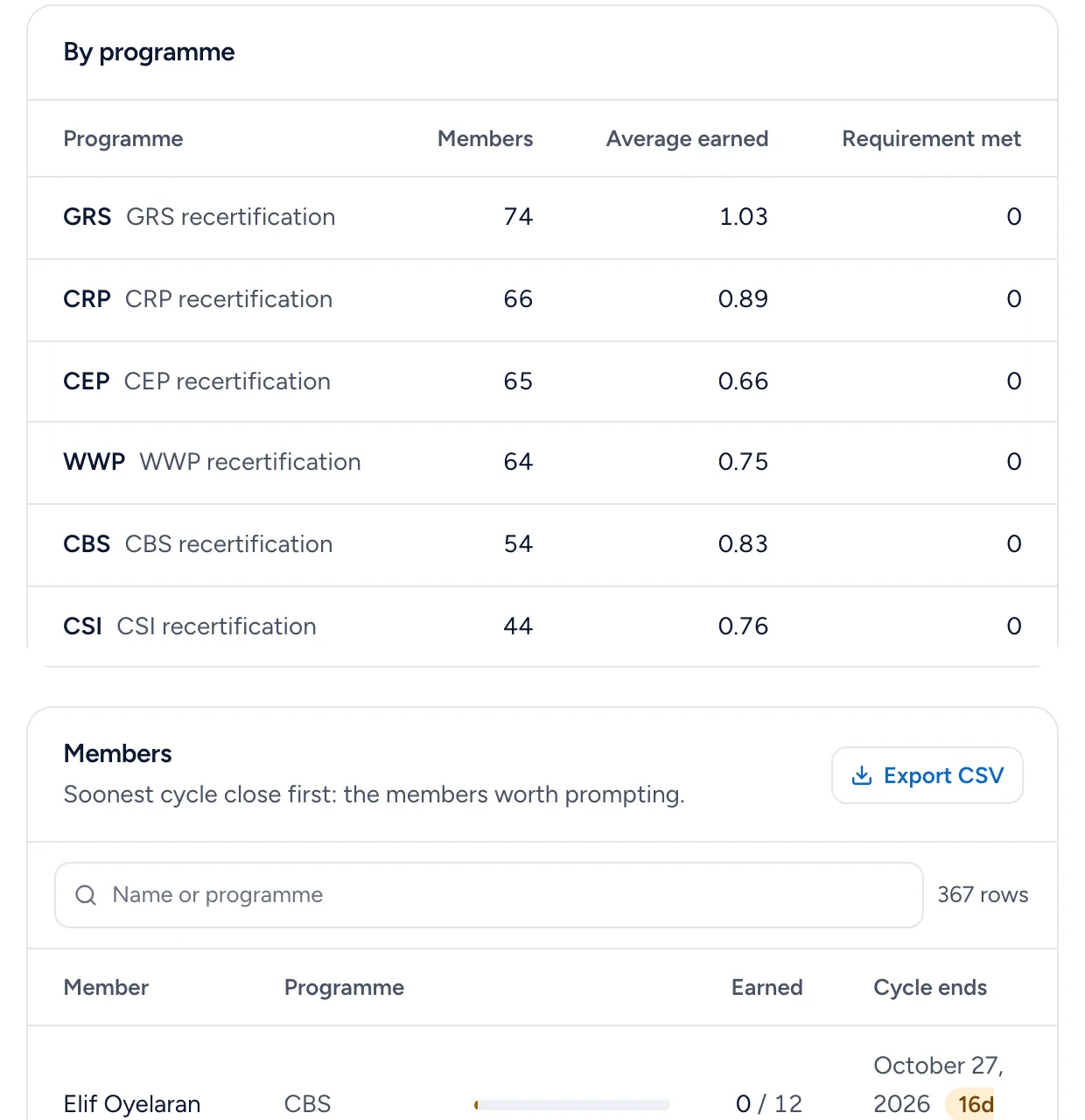
Every member’s progress on one page
For each programme, staff see how many members hold the credential, how much they have earned on average, and how many have completed the cycle. The full record, member by member, downloads as a CSV file.
- Members holding each credential, and how many are complete
- Each member’s credit this cycle
- Download the whole record for your own system
See it with your own association’s name on it
We set up a demo for you and answer your questions. Or open the live demo and look around on your own.
Step by step
How it works
Once the rules are set, credit follows from what members do.
- 1
Set up a programme
One for each credential, set up with you. It says how long a cycle runs and how much credit it requires.
- 2
Say what earns credit
Attending an event earns the credit set on it. Contributions in the community count too, each with a limit per cycle.
- 3
Members earn it
By attending and by taking part. Credit is awarded when it happens, and the reason is recorded.
- 4
Everyone can see it
Each member sees their own progress. Staff see every member’s and can download it.
How it differs from a separate tracker
Credit is usually typed in by hand, in a spreadsheet or a separate system.
Recording credit
A spreadsheet or separate tracker
Attendance exported, credit typed in
One Roof
Awarded when attendance is recorded
What the member sees
A spreadsheet or separate tracker
A certificate by email, and a count they keep themselves
One Roof
Their progress this cycle, and what earned it
Credit for taking part
A spreadsheet or separate tracker
Rarely counted
One Roof
Counted, with a limit per cycle
A mistake in attendance
A spreadsheet or separate tracker
A second correction somewhere else
One Roof
Change the attendance and the credit follows
An audit
A spreadsheet or separate tracker
Pieced together from several files
One Roof
One record, with a reason and a date for each credit
In detail
What is included
Earning it
Events
You set the credit on each event, and it goes to those marked as attended.
Contributions
Taking part in the community earns credit too, such as an answer the asker accepted.
Limits
Each kind of contribution has a limit per cycle.
Corrections
If attendance is corrected later, the credit is taken back and the change is recorded.
Keeping track
Programmes
Each credential has its own programme, with its own cycle and requirement.
Member progress
Each member sees their progress, with what earned every credit.
Staff overview
Staff see who holds each credential, and who has completed the cycle.
Export
Every member’s credit, by programme, can be exported as a CSV file.
Questions
What teams ask about it
How is credit awarded?
When staff record that a member attended an event, the member is awarded that event’s credit towards each credential they hold. Credit is for attending, not for registering.
Can members earn credit for things other than events?
Yes. Contributions in the community, such as an answer the asker accepted, can earn credit. Each kind has its own value and a limit per cycle.
Can we run more than one credential?
Yes. Each credential is its own programme, with its own cycle length and requirement. A member who holds two sees two counts. Each member’s cycle runs from the date they joined.
What if attendance was recorded wrongly?
Change it. If an attendance is withdrawn, the credit awarded for it is taken back, and a record of the change is kept.
Can we get the credit records out?
Yes. Every member’s credit by programme can be downloaded as a CSV file at any time. Credit earned can also be sent to your own systems by webhook as it happens.
Does it replace our learning management system?
No. It tracks credit earned through the community and its events. Courses stay in your learning system.