Employer accounts
Each company membership in one place, with its people, seats and renewal.
- Members linked automatically
- Seats used and unused
- Renewals coming up

One view of each company
See every member from one employer together, with how many seats they use and when the account renews.
Members are linked for you
Give the account the company’s email domain. Members with that domain, or with that employer on their profile, are linked automatically. New ones are picked up each day.
Be ready for a renewal call
See which accounts renew in the next 60 days, how many seats are unused, and how many of their people have gone quiet.
Step by step
How it works
Set up an account once and the list of people keeps itself up to date.
Step 1
Add the employer
Its name, email domain, number of seats, renewal date and main contact.
Step 2
Members are linked
By email domain or employer name. Staff can add or remove anyone by hand.
Step 3
See seats and activity
Seats used, seats unused, and how many members have been quiet for 90 days.
Step 4
Prepare for renewal
Accounts renewing soon are listed, with members at risk in each.
The account
Everyone from one employer on a single page
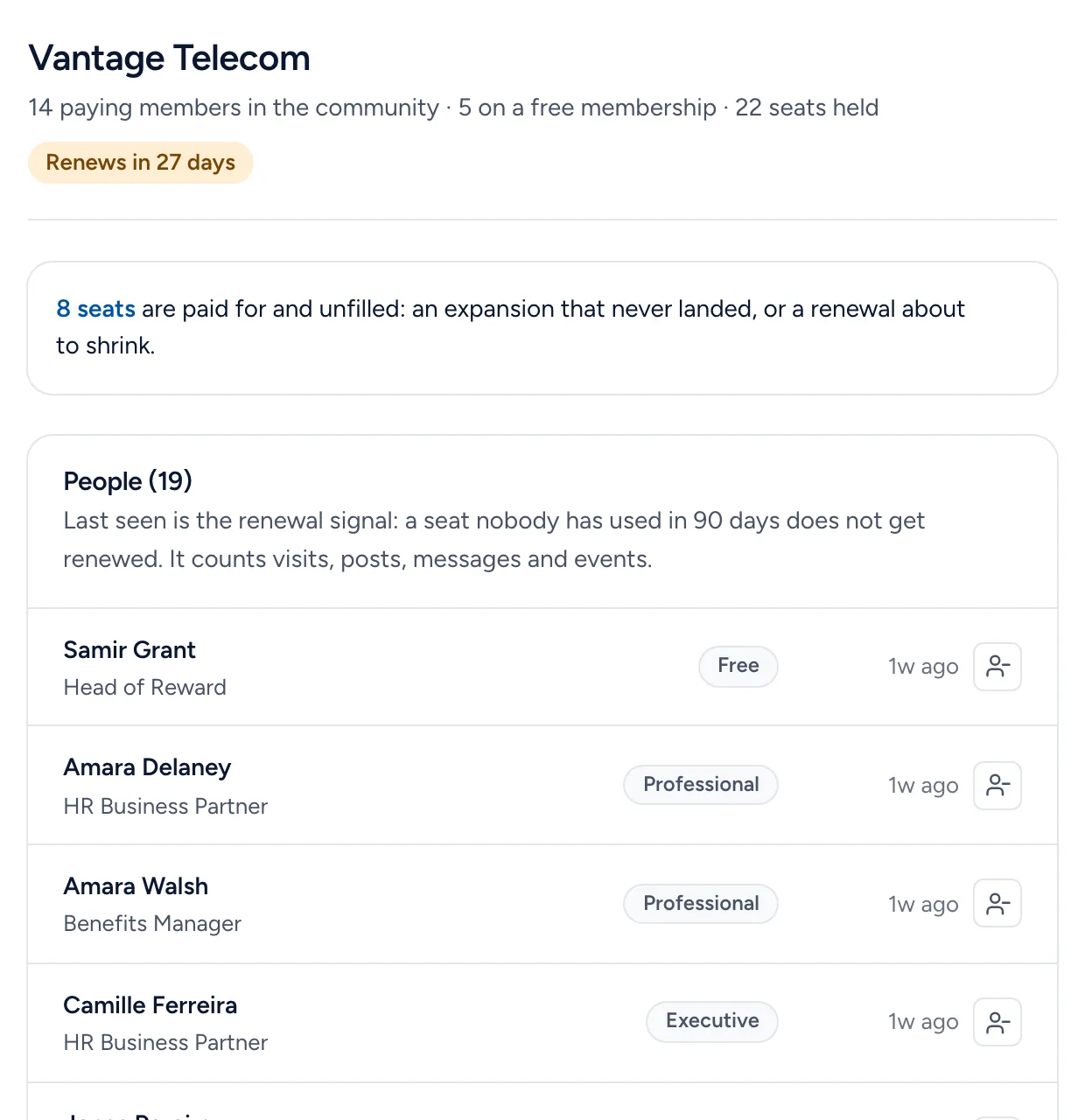
Each account shows its people with their member type and when they were last active. You see seats used against seats held, and a notice when the company has more paying members than seats. Notes and the main contact are kept with the account.
- Each person, their member type and when they were last active
- Seats used against seats held
- A notice when there are more members than seats
Renewals
Which company memberships need attention
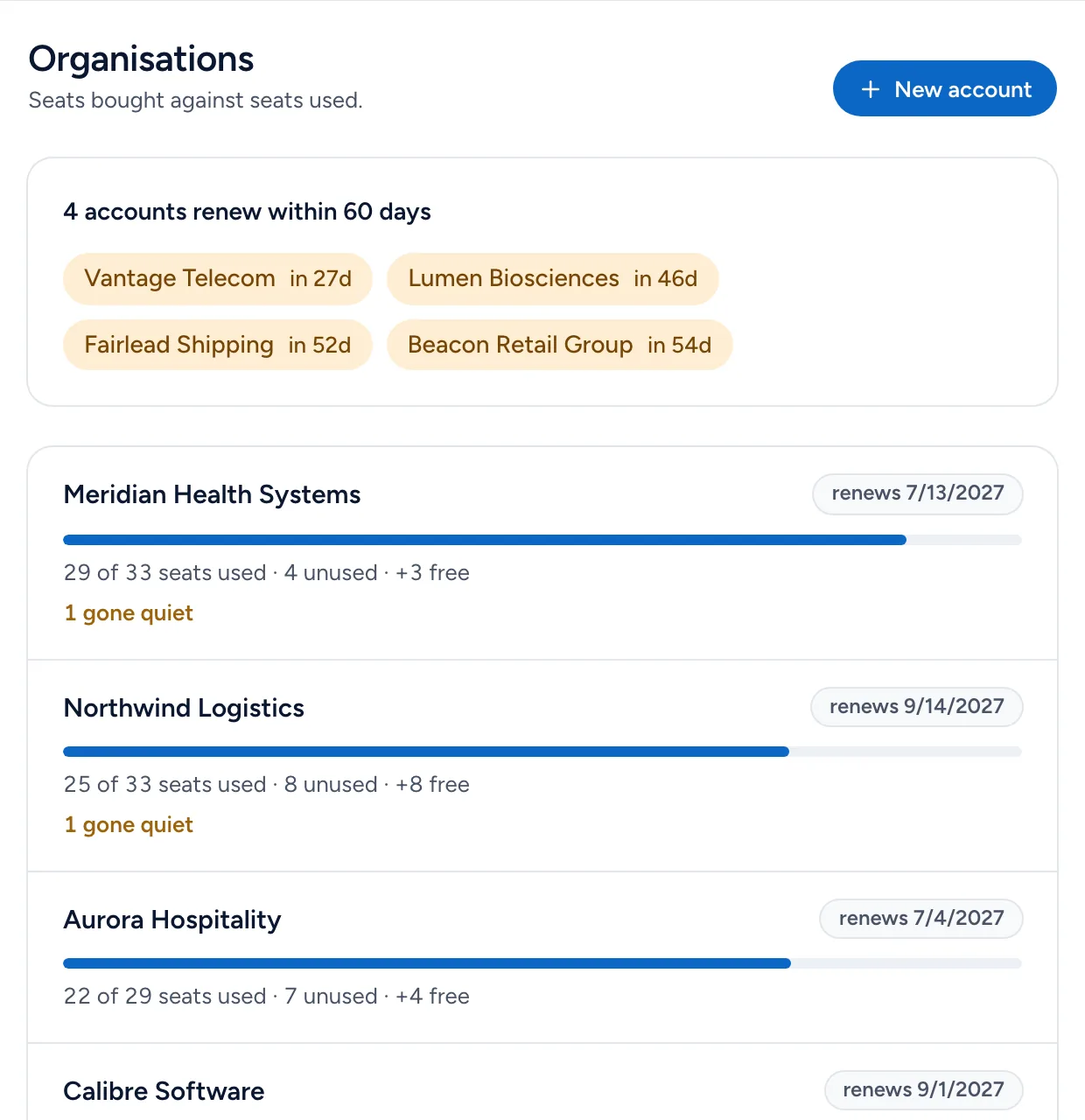
The members-at-risk page has a table of employer accounts, showing the accounts with quiet members or unused seats and when each renews. Read it before a renewal call.
- Members at risk in each account
- Unused seats the employer is paying for
- Days until renewal
See it with your own association’s name on it
We set up a demo for you and answer your questions. Or open the live demo and look around on your own.
In detail
What is included
The account
Details
Each account holds a name, email domain, seats, renewal date, contact and notes.
Automatic linking
Members are linked by email domain or employer name, checked every day.
Add or remove by hand
A member linked or unlinked by staff stays that way.
Merge duplicates
Two accounts for the same company can be joined into one.
What you can see
Seats
See seats used and unused, and any members over the number of seats held.
Gone quiet
The account’s members who have not been active for 90 days are listed.
Renewals
See which accounts renew in the next 60 days.
Change record
Every change to an account is recorded, with who made it.
How it differs from a spreadsheet of companies
Company memberships are often tracked in a spreadsheet that nobody updates when people join or leave.
Who belongs to the company
A spreadsheet
A list typed in once
One Roof
Linked by email domain and updated every day
Seats used
A spreadsheet
Counted by hand
One Roof
Counted for you, with unused seats shown
Activity
A spreadsheet
Not known
One Roof
When each person was last active, and who has gone quiet
Renewal
A spreadsheet
A date in a column
One Roof
A list of accounts renewing soon, with their risk
Duplicate companies
A spreadsheet
Found by accident
One Roof
Merged into one account
Questions
What teams ask about it
How are members linked to an employer?
Automatically, when a member’s email domain matches the account’s domain, or the employer on their profile matches the account’s name. This is checked when the account is created and again every day. Public domains such as gmail.com cannot be used.
What if a member is linked to the wrong company?
Staff can remove them or add them to the right account. A member changed by hand is not moved again automatically.
What happens when a company uses more seats than it holds?
Nothing is blocked. The account shows a notice that it has more paying members than seats, which you can raise with the employer.
Can the employer’s own contact manage the account?
No. The contact is the person your association talks to, and your staff manage the accounts.
Do members see anything different?
A member’s employer is shown on their profile. People at the same employer are suggested to each other as connections, with the reason shown. There is no separate page for a company.
Where do seats and renewal dates come from?
Your staff enter them on the account. They are not yet filled in from your membership system.