Moderation and safety
A safe, professional community where people make the decisions.
- New posts checked by AI
- A person makes every decision
- Every decision on record

Step by step
How it works
From a new post to a decision the member is told about.
Step 1
A post is checked
AI checks it for four kinds of problem as it is posted.
Step 2
Or a member reports it
With a reason: spam, harassment, off topic, confidential or other.
Step 3
A moderator decides
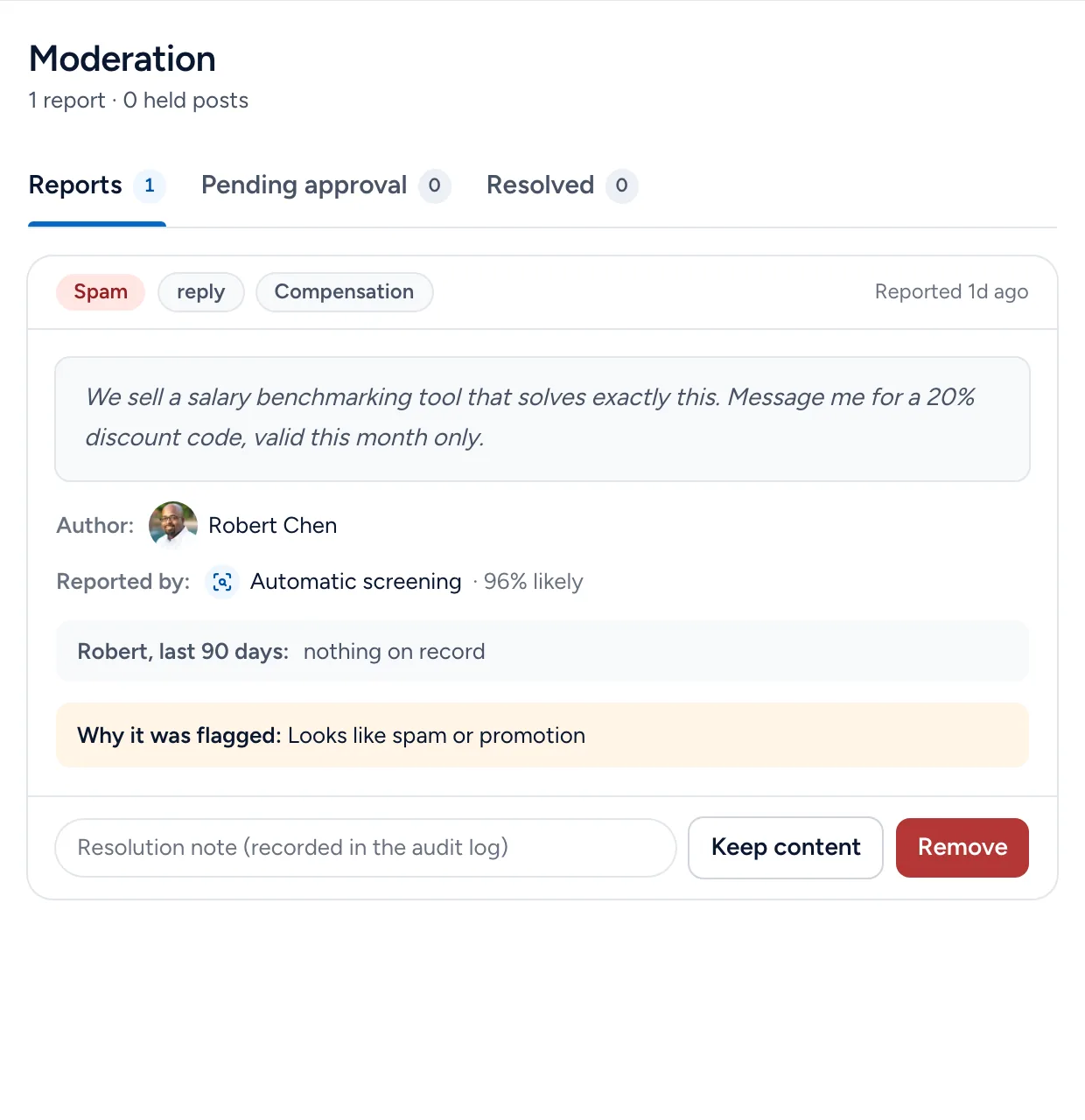
They see the post, the reason, and the author’s history, then keep or remove it.
Step 4
Everyone is told
The author is told the decision, and the member who reported it hears the outcome.
Problems are caught early
AI reads each new post for spam, abuse, personal details and confidential information. A doubtful new discussion is held for a moderator before other members see it.
A person makes every decision
AI only holds or flags a post, and a moderator then reads it and decides. Nothing is removed automatically. A moderator cannot decide a report about their own post.
Every decision has a reason
Removing a post or suspending a member needs a written reason. The decision, the reason and who made it are recorded and cannot be edited.
AI screening
Four checks on every new post
Each new post is checked for spam, abuse, private details about another person, and an employer’s confidential material. The checks are written for a professional community. Ordinary posts about pay, vendors or complaints are not stopped. If the AI service is slow or unavailable, posts are published as normal.
- A doubtful new discussion is held until a moderator approves it
- Less certain cases are published and flagged for a moderator
- Edits and private messages are checked too
For moderators
One queue with what you need to decide
Moderators see reports and held posts in one place. Each item shows the post, why it was reported or held, and how the author has behaved in the last 90 days. A moderator can keep or remove a post, lock or move a discussion, and warn or suspend a member.
- Reports, posts waiting for approval, and past decisions
- Warn a member, or suspend them for a set number of days
- A suspended member can read but not post, and returns automatically
For members
Members can protect themselves
Any member can report a post, a file or a private message, and can block another member. A block stops messages both ways. The two are also no longer suggested to each other as connections, mentors or experts.
- Report a post, a file or a private message
- Block a member, in both directions
- No messages or mention alerts from a member you blocked
See it with your own association’s name on it
We set up a demo for you and answer your questions. Or open the live demo and look around on your own.
How it differs from basic forum moderation
A basic forum waits for someone to complain, then lets a moderator delete the post.
Finding problems
A basic forum
Only when a member reports one
One Roof
AI checks every new post, and members can report
Who decides
A basic forum
A word filter, or a moderator
One Roof
Always a person, with the post and history in front of them
The reason
A basic forum
Often not recorded
One Roof
Required and kept on record
The author
A basic forum
Finds the post gone
One Roof
Is told what was decided
A removed post
A basic forum
Deleted
One Roof
Hidden, and can be restored
In detail
What is included
Catching problems
AI screening
Each new post is checked for spam, abuse, personal details and confidential material.
Member reports
Members can report posts, replies, files and private messages.
First-post approval
Hold a member’s first discussion in a space, if you choose.
Blocking
One member can block another, and the block applies across the community.
Dealing with them
Moderation queue
Reports, held posts and past decisions are in one place.
Lock, hide and move
Lock a discussion, hide or restore a post, or move it to another space.
Warn and suspend
A warning or a suspension needs a reason. A suspension lasts a set number of days or until it is lifted.
Decision record
Who decided what, when and why is kept permanently.
Questions
What teams ask about it
Does AI remove posts?
No. AI can hold a new discussion for a moderator to read, or flag a post that is already published. Only a moderator can remove anything.
What does the AI check for?
Four things:
- Spam or promotion
- Abuse
- Private details about another person
- An employer’s confidential material
It does not check posts written by your own staff.
What happens to a post that is held?
Only its author and your moderators can see it. The author sees a note that it is waiting for a moderator, and is told when it is approved or rejected.
Who can moderate?
Moderators, community managers and administrators. A chapter or committee’s leaders can pin and lock discussions in their own group, and nothing more.
Can moderators see who wrote an anonymous post?
Yes. Other members cannot see the author. Moderators and staff can, which stops anonymous posting being used to avoid the rules.
Can we require approval before a new member posts?
Yes. For each space, you can require that a member’s first discussion there is approved by a moderator.