Member retention
See which members may not renew while there is time to help.
- A reason for every member listed
- Every contact logged
- See who came back

Know before the renewal date
The list shows paying members who have gone quiet, with their renewal date, in time to reach them.
A clear reason and a next step
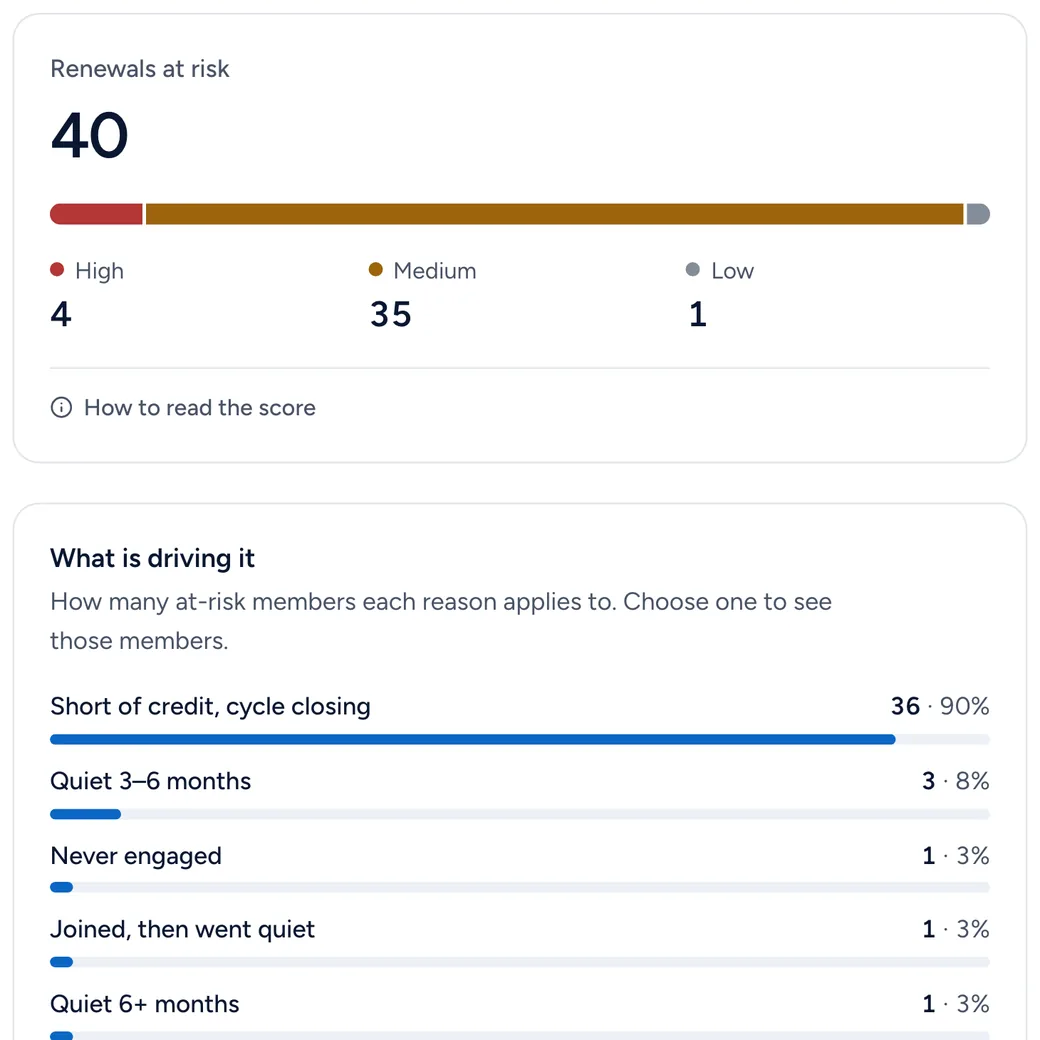
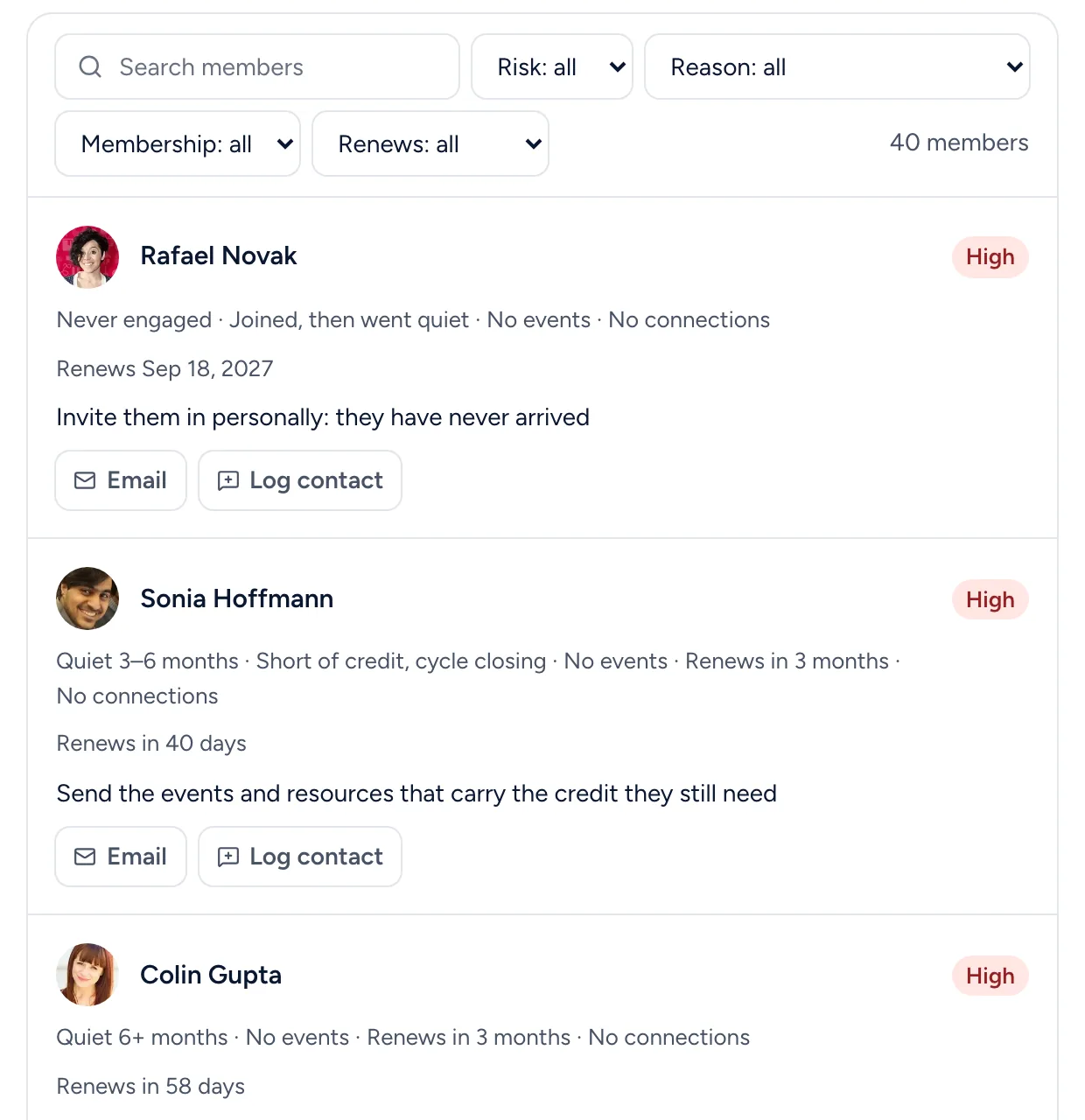
Each member is listed with the reason: never active, quiet for months, short of credit, or unhappy in a post. A suggested next step is shown next to it.
No member is called twice
Staff log each contact with a note. Everyone on the team sees who was contacted, when, and who made the contact.
The reasons
Why each member is on the list
A member is listed only when there is a clear reason. You can see how many members share each reason. That tells you whether the problem is new members who never started, long-time members who drifted away, or people short of credit.
- Never active, or quiet for 90 days or more
- Short of recertification credit with the cycle ending soon
- A recent post that shows the member is unhappy, found by AI
Outreach
Log every contact in one place
When staff contact a member, they log it with a short note that only staff can see. The member can be hidden from the list for a while, so the team can work through the rest. Later, you see how many contacted members became active again.
- A note for each contact, seen only by staff
- Hide a member for 30, 60 or 90 days
- A count of contacted members who became active again
Employer accounts
Spot a company membership at risk
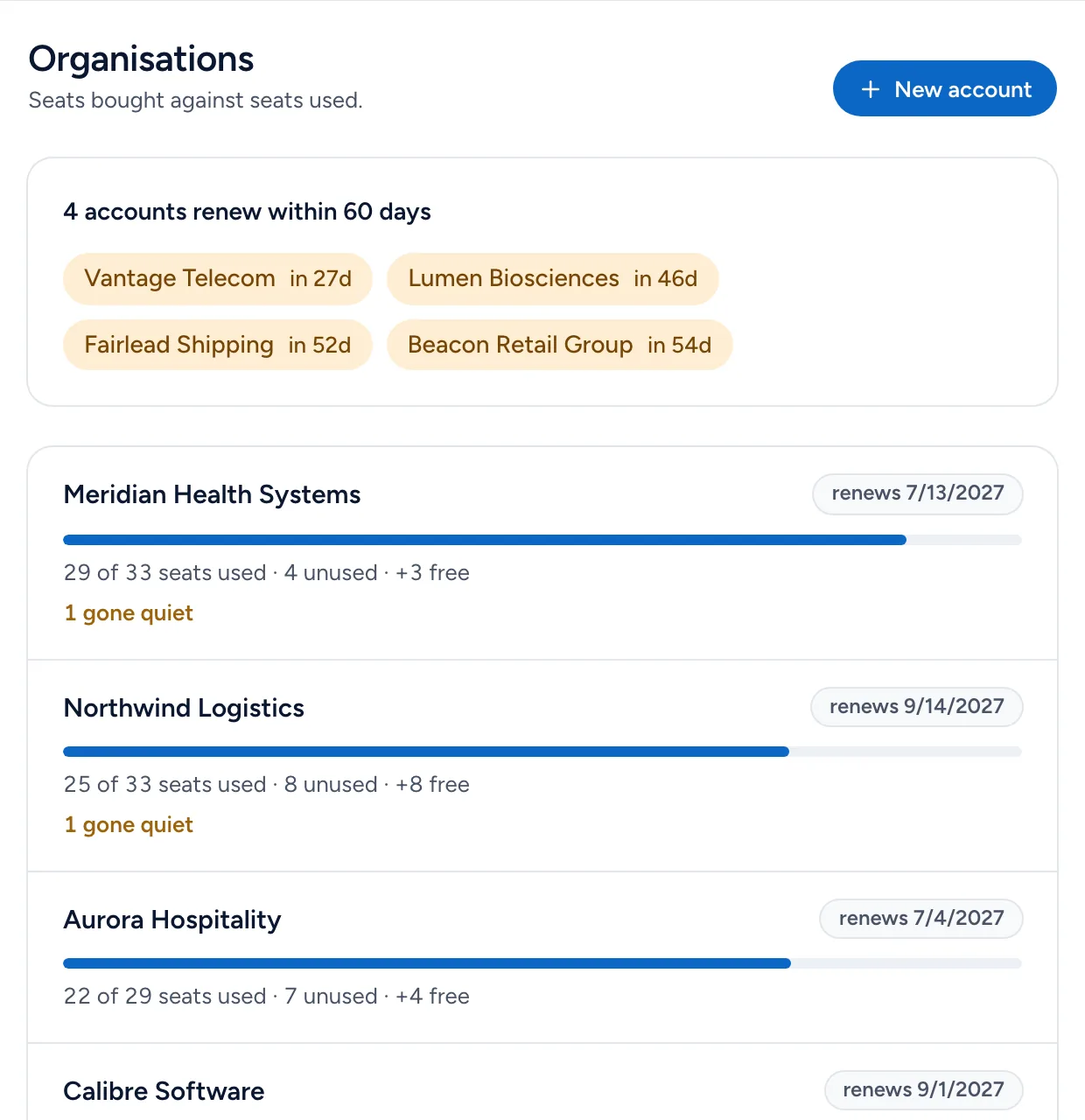
For associations with company memberships, one table shows each employer account: seats used and unused, how many of its members are at risk, and when it renews. One quiet company can matter more than many quiet individuals.
- Seats used and unused for each employer
- Members at risk in each account
- The renewal date beside them
See it with your own association’s name on it
We set up a demo for you and answer your questions. Or open the live demo and look around on your own.
Step by step
How it works
One Roof takes what the community already records about members and turns it into a list your team can work through.
- 1
Activity is checked every day
Posts, replies, events, messages and visits, with nothing for staff to enter.
- 2
Members at risk are listed
With a high, medium or low risk level, the reasons, and the renewal date.
- 3
Staff make contact and log it
Add a note, and hide the member from the list for 30, 60 or 90 days.
- 4
You see who came back
Members who became active again after being contacted are counted.
How it differs from an activity report
A report of who logged in, which most platforms have, does not tell you who to call.
Who is listed
A login or activity report
Everyone, sorted by last login
One Roof
Only members with a clear reason, highest risk first
Why
A login or activity report
Not shown
One Roof
The reasons, in words, for each member
What to do
A login or activity report
Left to you
One Roof
A suggested next step for each member
After you act
A login or activity report
Nothing is recorded
One Roof
The contact is logged, and you see who came back
Renewal date
A login or activity report
In another system
One Roof
Shown next to each member
In detail
What is included
The list
Risk level
Each member is rated high, medium or low, according to the reasons that apply.
Filters
Narrow by risk level, reason, member type, or renewal within 30 or 90 days.
Trend
A weekly chart shows how many paying members are at risk.
Export
The whole list downloads as a CSV file, for your own systems.
Acting on it
Next step
Each member has a suggested action, based on the reason.
Contact log
Record who contacted the member, when, and a note.
Snooze
Hide a member for 30, 60 or 90 days, after which they return.
Win-back messages
An automatic message can go to quiet members. It is off until you switch it on.
Questions
What teams ask about it
How is a member judged to be at risk?
By what they do in the community. A member is listed for one of five reasons:
- They have never been active.
- They have been quiet for 90 days or more.
- They are short of recertification credit and their cycle ends soon.
- They joined in the last year and did not settle in.
- A recent post shows they are unhappy.
A renewal date coming soon, no events and no connections raise the risk level.
Is the score a prediction that a member will not renew?
No. It is a judgement about engagement, made with fixed rules you can read, and not a statistical prediction of renewal. Use it to decide who to look at first.
Do members know they are on the list?
No. The list, the reasons and the notes are seen only by your staff.
Where does the renewal date come from?
From your membership system, through the connection we set up with you during onboarding. If there is no date, the anniversary of the day the member joined is used, and staff can correct it.
Does it contact members automatically?
Only if you switch it on. There is an optional win-back message for quiet members, which is skipped for anyone your staff contacted in the last 30 days or have snoozed.
Does AI decide who is at risk?
Mostly not. The rules are fixed and based on activity. AI is used for one reason only: to notice a post in which a member sounds unhappy with the association. Anonymous posts are never used for this.