AI assistant
Members ask a question and get an answer from your community, with sources.
- Only your community’s content
- Only what each member is allowed to see
- Sources on every answer

Members find answers that already exist
The assistant finds answers that are already in your community, even when a normal search misses them, and links to the discussion.
Private content stays private
The assistant only uses what the member asking is allowed to see. A board discussion is never used to answer someone who is not on the board.
You see what members need
Questions the assistant could not answer are listed for staff, without the member’s name. This shows you which topics your community needs more content on.
For your staff
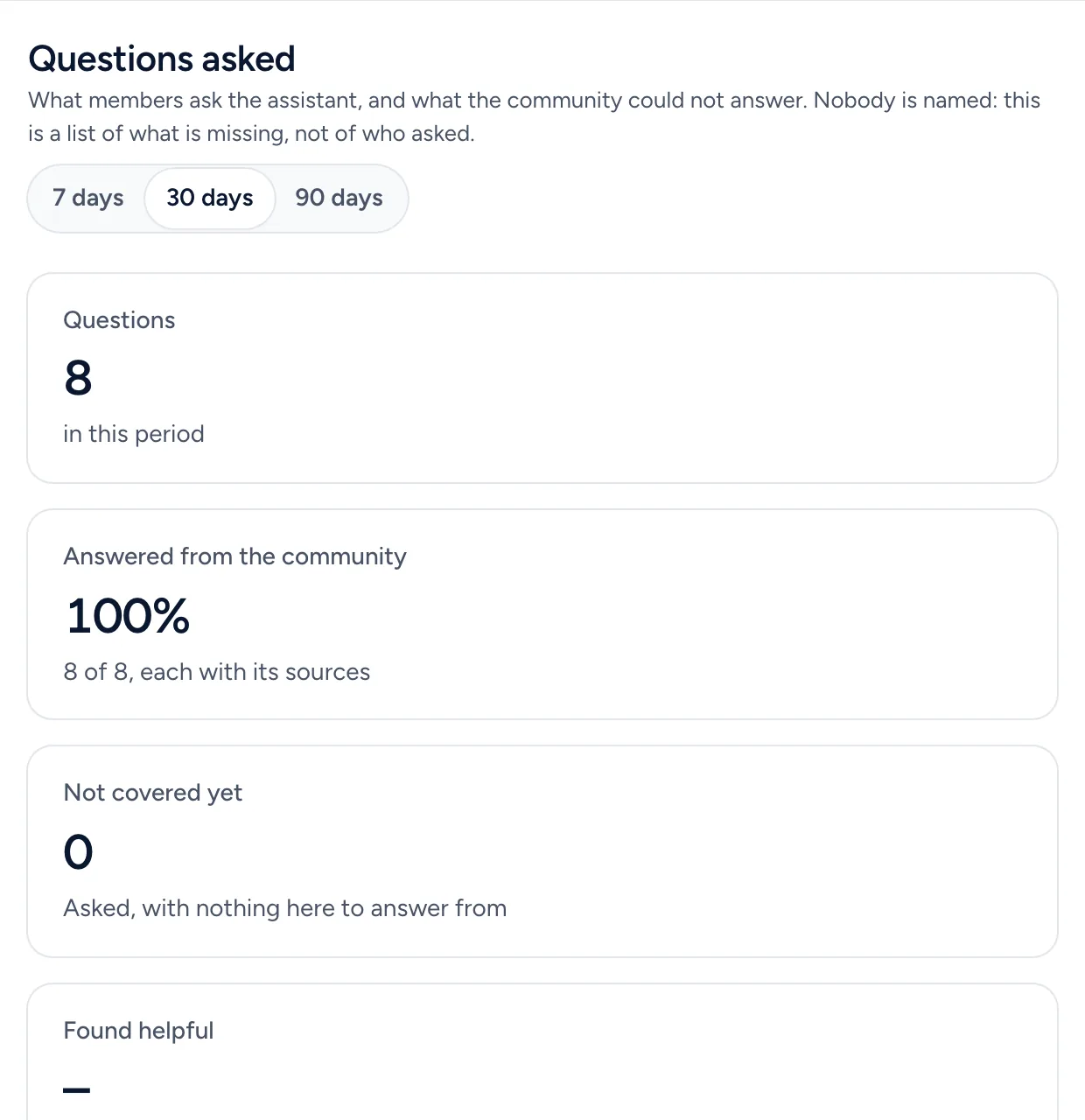
The questions your community could not answer
Staff see a list of every question the assistant could not answer. Each one is a topic your members need and your community does not yet cover, and the next webinar or guide can be planned around what members asked.
- Questions asked and answered, by period
- Listed without the name of who asked
- What members marked as unhelpful, and why
See it with your own association’s name on it
We set up a demo for you and answer your questions. Or open the live demo and look around on your own.
Step by step
How it works
The assistant reads what is already in your community and needs no setup or training.
- 1
A member asks in plain words
From the Ask AI page, on a phone or at a desk, as they would ask a colleague.
- 2
It finds what they are allowed to see
Discussions, replies and the text inside files, limited to the spaces that member can see.
- 3
It answers with its sources shown
The answer appears as it is written, with each claim linked to the post or file it came from.
- 4
It says when there is no answer
It records the question as a gap for your staff and does not make something up.
How it differs from a general AI chatbot
The difference is in what the assistant reads, and what it will not do.
What it reads
A general AI chatbot
The open internet and whatever the model already knows
One Roof’s assistant
Only your community’s discussions and files
Who may see what
A general AI chatbot
Knows nothing of your spaces or member types
One Roof’s assistant
Uses only what the member asking is allowed to see
Where an answer came from
A general AI chatbot
Usually not shown
One Roof’s assistant
Every answer links to its posts and files
When it does not know
A general AI chatbot
Often writes a believable answer anyway
One Roof’s assistant
Says the community has not covered it, and tells staff
In your community
A general AI chatbot
Sits outside it
One Roof’s assistant
Never posts, replies or acts as a member
In detail
What is included
For members
Sources on every answer
Each answer lists the discussions and files it used, with a link to open each.
Reads inside files
The text inside PDF, Word, PowerPoint and Excel files in the library is read too.
Follow-up questions
When a member asks a further question, the assistant remembers what was said before.
Their own history
Past conversations are kept for the member, who can remove any of them.
For staff
What members asked
A report shows the questions asked in each period and how many were answered.
Without names
Staff see the questions but not who asked each one.
Whether it helped
Members mark an answer helpful or not, and can say why.
A limit per member
Each member has a daily limit, which keeps the cost predictable.
Questions
What teams ask about it
From the guidesBefore you put an AI assistant in front of your membersWhat does the assistant read?
Your community’s discussions and replies, and the text inside PDF, Word, PowerPoint and Excel files in the library. It reads nothing from outside the community.
Can it reveal something from a private space?
No. For every question it uses only what the member asking is allowed to open. A private committee space is used only to answer members of that committee.
What happens when it does not know?
It says the community has not discussed the question, and the question is recorded for staff as a gap. It does not write an answer from general knowledge.
Can staff see who asked what?
No. Staff see what was asked and what could not be answered, without the name of the member who asked.
Is our content used to train a model?
No. The assistant runs on models hosted in Microsoft Azure, through Microsoft Foundry. Under Microsoft’s terms for that service, your content and your members’ questions are not used to train or improve any model. They are not available to OpenAI or to other customers.
Does it replace members answering each other?
No. It can only repeat what members have already written, and its job is to make that easier to find.