Integrations
One Roof works with the systems you already use.
- Your membership system stays the source of truth
- Signed webhooks
- Set up with you during onboarding








One login
Members arrive from your website already signed in, with the login they have now.
No double entry
Who is a member, their member type, their committees and their renewal date all come from your membership system. A lapsed member loses access automatically.
Activity goes back to your systems
A post, an event registration or credit earned is sent to your own systems as it happens. You can see engagement on the member record, next to the renewal date.
Webhooks
Send community activity to your other systems as it happens
An administrator adds the address of a system that should receive updates, and chooses which events to send. Each one goes out as a signed message within about a minute. If your system is down, it is sent again.
- Six events, from a new post to credit earned
- Signed to the Standard Webhooks specification
- Every delivery logged, with what came back
For your developers
Messages your systems can verify
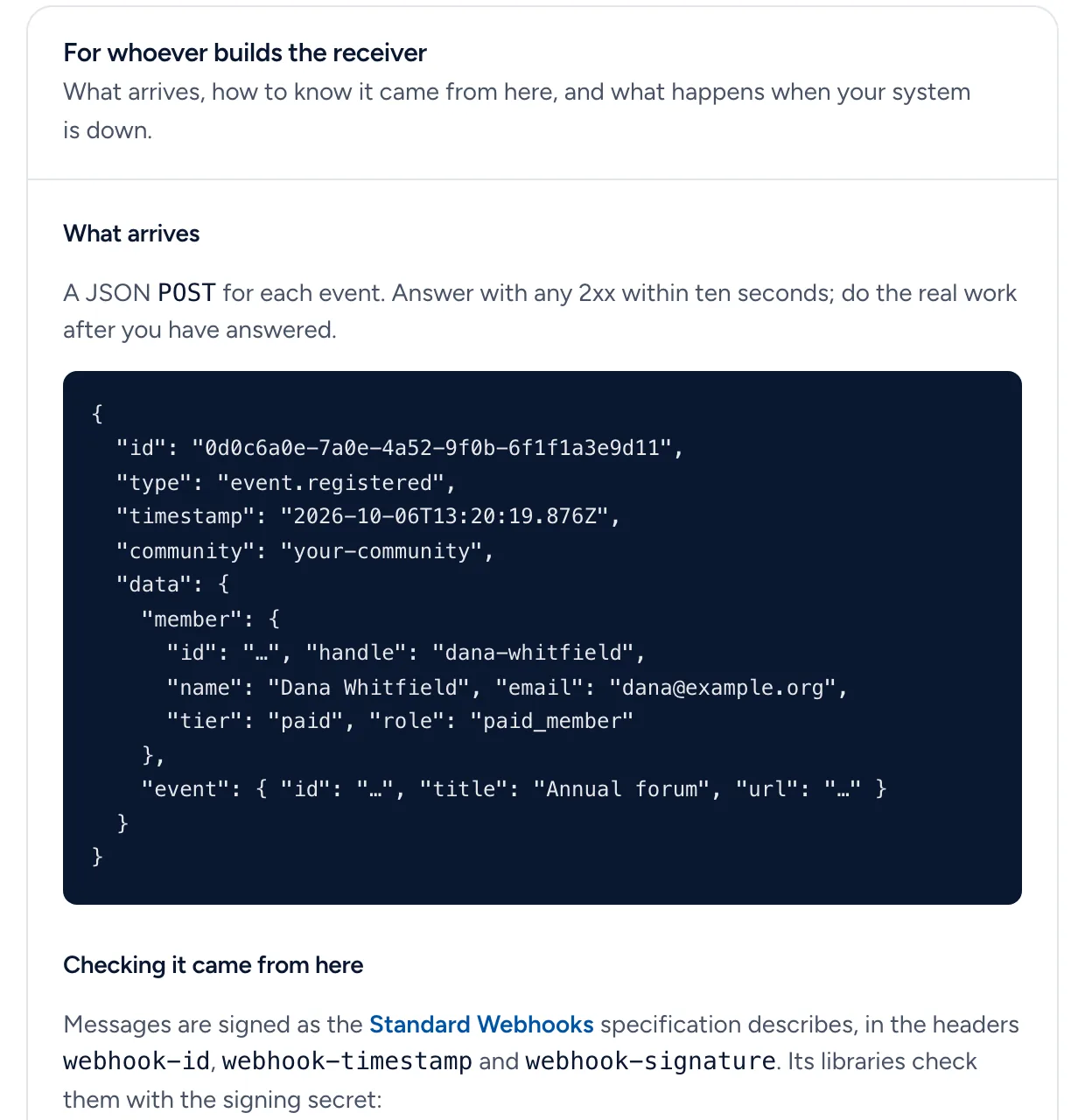
Each message is plain JSON with a type, a time and the member it is about. It is signed with a secret only you hold, so your system can confirm it came from your community, using a standard library.
- Retried seven times over a day and a half
- The same ID on every attempt, so a repeat can be ignored
- A member who posted anonymously is not named
See it with your own association’s name on it
We set up a demo for you and answer your questions. Or open the live demo and look around on your own.
Step by step
How we set up a connection
We set up the connections with you, because every association’s systems are configured differently.
- 1
We look at what you run
Your membership system, how members sign in, and what else should hear from the community.
- 2
We agree what data is shared
Which of the four connections your system supports and how often each will run, put in writing before you sign.
- 3
We set it up and test it
With real accounts of every member type, including a lapsed one, before any member is invited.
- 4
You see it working
When a member’s type changes in your membership system, their access in the community changes with it.
What to ask about any integration
These are the questions to ask any vendor that says it integrates, with our answers.
Does it integrate with our AMS?
What you are often told
“Yes”, with a logo
What One Roof does
We tell you which of the four connections your system supports, before you sign
Which way does data go?
What you are often told
In, usually
What One Roof does
In from your membership system, and out by webhook
When something fails
What you are often told
Found out weeks later
What One Roof does
Every delivery is logged and shown to an administrator, and a failed one is retried
Who sets it up
What you are often told
You, from a settings page
What One Roof does
We do, with your team, during onboarding
Can developers trust a message?
What you are often told
Not always signed
What One Roof does
Signed to a public specification, with a secret you hold
In detail
What is included
Data coming in
Sign-in
Single sign-on works with your membership system or identity provider, by SAML or OpenID Connect.
Membership data
Member types, status and renewal dates are kept up to date from your membership system.
Committees and chapters
Their membership lists decide who can open each private space.
File import
Dues and renewals can be loaded from a CSV export, for the board report.
Data going out
Webhooks
A message is sent for posts, replies, event registrations, downloads, poll votes and credit earned.
Signed messages
Each one is signed, with a secret you can replace at any time.
A test button
Send a harmless message to see your receiver answer before anything real is sent.
Exports
Insights, members at risk, sponsor reports and credit records download as CSV files.
Questions
What teams ask about it
From the guidesThe four connections between a community and your AMSWhich membership systems do you connect to?
The ones associations use most, including iMIS, Fonteva, Nimble AMS, netFORUM, MemberSuite, Personify, re:Members and Novi AMS, and CRMs used as a membership system such as Salesforce and Microsoft Dynamics 365. What a connection can carry depends on what your system makes available, and we tell you that before you sign.
Is it a connector we switch on ourselves?
Webhooks are, and an administrator adds one in a minute. The connection to your membership system and sign-in is set up with you during onboarding, because every installation is configured differently.
What do webhooks send?
A signed JSON message when a member does one of six things:
- Starts a discussion
- Replies
- Registers for an event
- Downloads a file
- Votes in a poll
- Earns recertification credit
Each message names the member and links to the item. A member who posted anonymously is not named.
What happens if our system is down?
The message is sent again, seven times over about a day and a half. If your address accepts nothing for three days, it is switched off and marked, so an administrator can see why.
Our AMS has no API. Can we still connect?
Usually. Single sign-on covers logging in if your system or an identity provider in front of it supports SAML or OpenID Connect, and a scheduled file covers membership data.
Can members pay their dues in One Roof?
Yes, if you want them to. Set a yearly or monthly price for each member type on your association’s own Stripe account. Members join, upgrade and renew through Stripe, and their member type and renewal date update when they pay. If your membership system already takes dues, leave this switched off and the community follows your membership system instead.
Who can set up a webhook?
Administrators only, because a webhook sends members’ names and email addresses to another system. Every change is written to the audit log.