Integrations
Integrating a community with your AMS: what it really means
An AMS integration is up to four connections: sign-in, member data, committee rosters and activity written back. What to ask, and what ten AMS vendors document.
 The One Roof team10 min read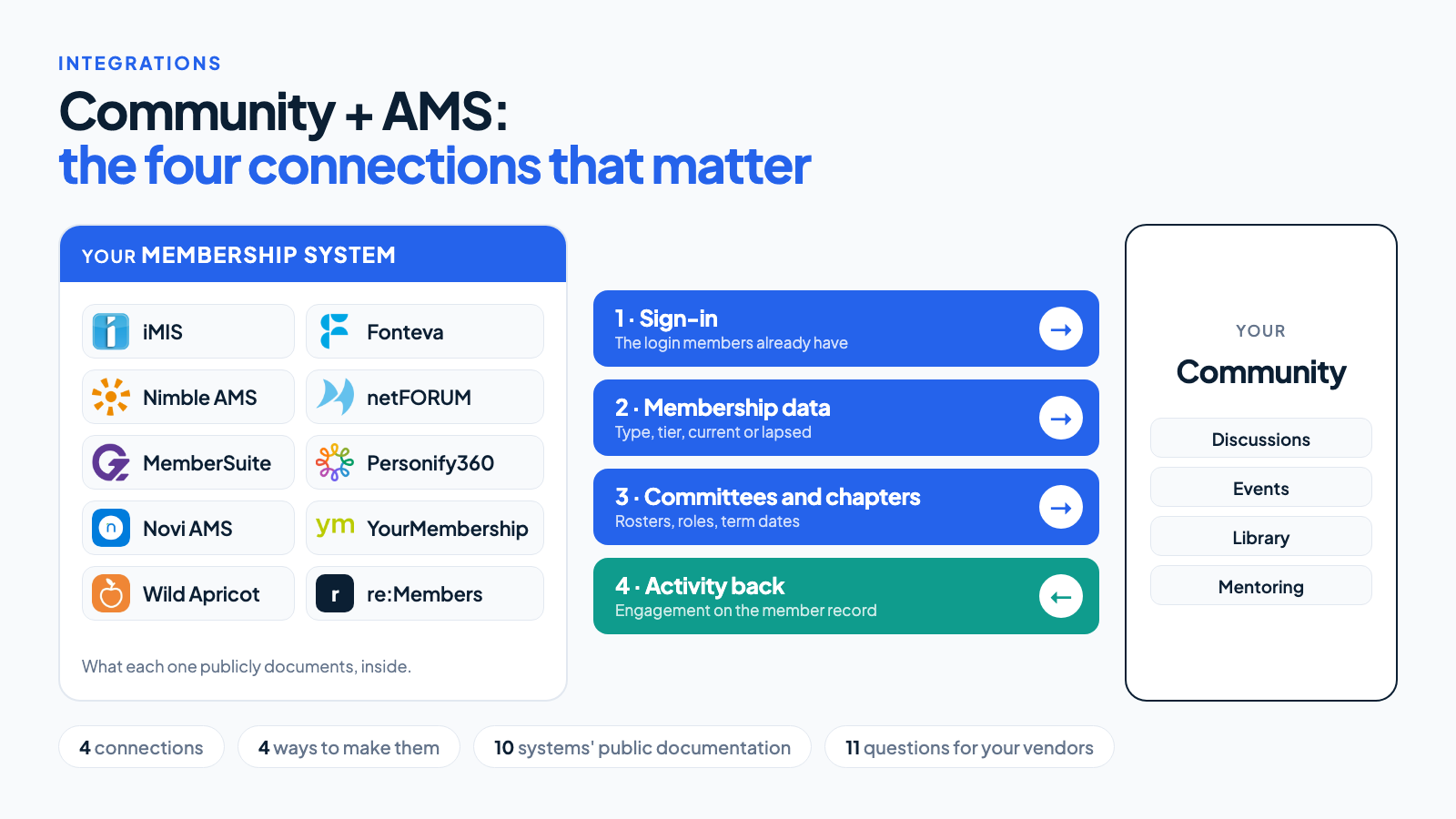
Tap the picture to see it at full size.
In this article⌄
“Does it integrate with our AMS?” is the first question most associations ask a community vendor, and the answer is always yes. The useful question is what, exactly, passes between the two systems, in which direction, and how often. This article breaks that down so you can tell a real integration from a logo on a slide.
What an AMS integration includes
An AMS integration is up to four separate connections between a community platform and an association management system: single sign-on, membership data coming in, committee and chapter rosters, and community activity written back to the member record. You may not need all four, and a vendor who says “we integrate” may mean only the first.
1. Sign-in
Members use the login they already have. They click through from your website and arrive in the community already signed in.
This is the one to insist on. A member who is asked to create a second password, or to reset one they have forgotten, has been given a reason to leave before they have seen a single discussion.
2. Membership data coming in
The community needs to know who each person is and what they are entitled to:
- Name, email and employer.
- Member type or tier, which decides which spaces they can open.
- Whether they are current, lapsed or in a grace period.
- Renewal date, if you want to show renewal prompts or study retention.
The question to ask is how quickly a change arrives. If a member lapses on Monday, when do they lose access to the members-only space? “Overnight” is normal and usually fine. “When someone uploads the spreadsheet” is not an integration.
3. Structure
Committees, chapters, sections and special interest groups already exist in your AMS, with their rosters, roles and term dates. If the community reads them, a new committee member gains access to the committee’s private space without anyone doing anything, and loses it when their term ends.
Without this, staff maintain two sets of rosters, and the private spaces drift out of date.
4. Activity going back
This is the connection that makes the community measurable. Each post, reply, download, event attended or mentoring session becomes an activity on the member’s record in the AMS.
It is what lets you answer the board’s question. With activity on the record, you can compare the renewal rate of members who took part in the community with those who did not, and see which members have gone quiet before their renewal date.
Two related flows are worth asking about: continuing education credit earned in the community reaching the system that tracks certification, and email unsubscribes agreeing in both places.
Which system owns what
Decide this once, and the rest of the integration is detail. Every piece of data should have one home, and the other system should only read it.
| Data | Owned by | Why |
|---|---|---|
| Name, email, employer | AMS | It is where the member, and your staff, already correct it |
| Member type and status | AMS | It follows payment, which the community knows nothing about |
| Committee and chapter rosters | AMS | Terms and roles are governed there |
| Profile photo, biography, interests | Community | Members maintain these themselves, and few membership systems have a place for them |
| Posts, replies, files | Community | The AMS needs to know that they happened, not what they say |
| Email preferences | One of them, chosen deliberately | An unsubscribe that is honoured in one system and ignored by the other is a complaint, and in some countries a legal problem |
When something can be edited in both places, sooner or later the two will disagree, and nobody will know which is right.
How the connections are made
There are four mechanisms. Most real integrations use two or three of them.
| Mechanism | What it is | Good for |
|---|---|---|
| Single sign-on | The AMS, or an identity provider such as Microsoft Entra or Okta, vouches for the member using SAML or OpenID Connect | Sign-in |
| API | The community asks the AMS for data, or writes to it, over the AMS’s programming interface | Membership data, structure, activity |
| Webhooks | The AMS tells the community the moment something changes | Changes that should take effect at once |
| Scheduled file exchange | A file of changes is produced and picked up on a schedule | Older systems, or data an API does not expose |
A scheduled file is not a failure. For data that changes daily, a nightly file that always works is better than a real-time connection that sometimes does not.
How fresh the data needs to be
Not everything needs to arrive at once. Match the speed to the consequence of being late.
| Change | Fast enough | Why |
|---|---|---|
| A new member joins | Minutes | They will try the community the same day, while they are interested |
| A member lapses | Overnight | A few more hours of access harms nobody |
| A committee roster changes | Overnight | Unless the committee discusses confidential matters, in which case removal should be immediate |
| Activity going back | Daily | Reports are read weekly or monthly |
| An account is suspended for conduct | Immediately | This is the one that cannot wait |
Ask a vendor for the connection your slowest acceptable answer needs, and you will often find the simpler, more reliable mechanism is enough.
What the major systems document
This is what each vendor says publicly, as we found it in October 2026. It tells you what is possible, not what is included in your licence: an API or single sign-on is sometimes a paid add-on, and what your own installation exposes depends on its version and configuration. Confirm with your vendor.
| AMS | What is publicly documented |
|---|---|
| iMIS | A REST API with OAuth 2.0, on iMIS Cloud and recent versions |
| Fonteva | Built on Salesforce, with its own developer documentation for APIs in Apex and REST |
| Nimble AMS | Also on Salesforce, with its own integration API |
| netFORUM | xWeb, a SOAP web service interface; its documentation says an xWeb user is created by the vendor once an xWeb licence is bought |
| MemberSuite | A REST and GraphQL API, with documented single sign-on |
| Personify360 | Data Services over OData, and web services; newer APIs are provided to customers directly |
| re:Members AMS (formerly Impexium) | A REST API, and a Microsoft Power Automate connector covering individuals, organisations, committees and event registration |
| Novi AMS | A published API that its vendor describes as two-way, and OpenID Connect sign-on |
| YourMembership | A REST API |
| Wild Apricot | An admin API with OAuth 2.0; its pricing page lists API access on all plans |
If your system is not here, the same four questions apply: is there an API, does it support SAML or OpenID Connect, can it send changes as they happen, and can it produce a scheduled export.
Questions for a community vendor
Ask for answers about your AMS specifically, not about integrations in general.
- Have you connected to our AMS before? If not, that is not disqualifying, but the price and timeline should reflect that they are building it.
- Which of the four connections are included? Sign-in, membership data, structure, activity back.
- How often does each one run? Real-time, hourly, nightly.
- Which direction does each go? Some documented integrations are one-way. Higher Logic’s own article on its Novi integration, for example, describes data flowing from the AMS to the community.
- What happens when it fails? Who is told, and does it catch up by itself?
- Who maintains it when our AMS is upgraded?
- What does it cost, now and each year?
Questions for your AMS vendor
The community vendor can only use what your AMS allows.
- Is API access included in our licence, and are there limits on how much it can be used?
- Is single sign-on included, and which standards does it support?
- Can an outside system write activities to a member’s record?
- Is there a test environment we can connect to first?
Where integrations go wrong
- Matching by email. Members change jobs and addresses. The match should use the member’s ID in the AMS, with email only as a fallback, or one person becomes two accounts.
- One-way without anyone noticing. Data arrives in the community, nothing goes back, and a year later the board’s question still cannot be answered.
- No test environment. The first real test happens on live member records.
- Silent failure. The nightly run stopped three weeks ago and nobody was told. Somebody should receive a message the first morning it fails.
- Lapsed members handled by deletion. When a member lapses, their access should change and their posts should stay. Removing the account removes the answers other members rely on.
- Built by someone who has left. A connection written by a contractor, with no documentation, breaks at the next AMS upgrade with nobody to fix it.
- Too much copied across. The community does not need dates of birth or payment history. Send only what it uses; everything else is a risk with no benefit.
Security and privacy
An integration is a door between two systems that hold personal data, so ask how it is locked.
- The connection should use credentials of its own, limited to what it needs, which can be revoked without touching anybody’s login.
- Ask where member data is stored, who at the vendor can see it, and how it is deleted when a member asks, or when you leave.
- Members should be able to see and control what the rest of the community sees about them, whatever the AMS holds.
How to tell an AMS integration is working
A year after launch, a well-integrated community is one where:
- No member has a community password.
- Nobody on staff maintains a roster in two places.
- A lapsed member loses access without anyone remembering to remove them.
- The membership team can pull a list of members who renew in ninety days and have not visited in sixty.
- The board report includes renewal rates for engaged and unengaged members, and nobody built it by hand.
If you have the first three, the integration is working. If you have all five, it is paying for itself.
How One Roof approaches it
One Roof connects to the membership system you already run, whether that is an AMS or a CRM used as one:
 iMIS
iMIS- re:Members AMS
 Personify360
 MemberSuite
 Fonteva
 netFORUM Enterprise
 Nimble AMS
 Novi AMS
 YourMembership
 Wild Apricot
- Salesforce
- Microsoft Dynamics 365
Product names belong to their owners. No partnership or endorsement is implied.
The connection covers all four: sign-in, membership data, committees and chapters, and activity written back to the member record. We set it up for you during onboarding, so there is no settings page left for your team to fill in, and before you sign we tell you how often each part will run with your system.
Your AMS is rarely the only system that wants to know what members do, so One Roof also sends webhooks. When a member posts, replies, registers for an event, downloads a file, votes in a poll or earns credit, a signed message goes to an address of yours within a minute or so, and is sent again if your system was down. An administrator adds one from the admin area, chooses which events it hears about, and can see every delivery and what came back. The messages follow the Standard Webhooks specification, so your developers can check them with a library they may already use.
This is what your system receives when a member registers for an event:
{
  "id": "0d0c6a0e-7a0e-4a52-9f0b-6f1f1a3e9d11",
  "type": "event.registered",
  "timestamp": "2026-10-06T13:20:19.876Z",
  "community": "your-community",
  "data": {
    "member": {
      "handle": "dana-whitfield",
      "name": "Dana Whitfield",
      "email": "dana@example.org",
      "tier": "paid"
    },
    "event": { "title": "Annual forum", "url": "https://…" }
  }
}
A member who posted without their name is not named in the message, and webhooks can only be pointed at an https address on the public internet.
Common questions
Do we need all four connections on day one?
No. Sign-in and membership data are the minimum for launch. Structure can follow within weeks. Activity going back is the one most often postponed and the one that pays for the rest, so put a date on it in the contract.
Our AMS has no API. Can we still integrate?
Usually. Single sign-on covers the first connection if the AMS, or an identity provider in front of it, supports SAML or OpenID Connect, and a scheduled export covers membership data and rosters. What you give up is speed, not function.
How long does an integration take?
Where the community vendor has connected to your AMS before, a few weeks, most of it spent waiting for access and testing with real accounts. A first-time connection takes longer, and the honest answer depends on what your AMS exposes.
What does an AMS integration cost?
There are up to three bills, and only one comes from the community vendor. Your AMS vendor may charge for API access, for single sign-on, or for a test environment. The community vendor may charge to build or switch on the connection, and again each year to maintain it. And your own staff or a consultant spend time matching records and testing. Ask each vendor for its figure in writing; the first is the one most often discovered late.
SAML or OpenID Connect?
Either. Both let members sign in to the community with the login they already have, and most systems that offer single sign-on support one or the other. Use whichever your AMS or identity provider already runs; the choice matters to whoever configures it, not to your members.
Does One Roof integrate with our AMS?
One Roof connects to the systems listed above, and the connection is set up for you during onboarding. What it can carry depends on what your AMS exposes: whether it has an API, whether that API accepts activity written to a member’s record, and whether your licence includes it. We tell you which of the four connections your system supports before you sign.
Is single sign-on the same as an integration?
No. Sign-on proves who somebody is at the moment they arrive. It does not keep their status up to date afterwards, tell the community which committees they sit on, or send anything back.
Who should own the integration on our side?
Whoever owns the membership system. The community team will feel the problems first, but the fixes are nearly always at the AMS end.