Migration
Moving an association community and keeping its history
How to move an association community off Higher Logic or any platform: the data export, redirects, a 12-week timeline and a go-live checklist.
 Boopesh MahendranCo-founder, One Roof14 min read
Tap the picture to see it at full size.
In this article⌄
- What a community actually holds
- Who does what
- How to export your data from Higher Logic
- Decide what not to move
- Keep every address working
- Authorship is the thing to get right
- Sign-in and subscriptions
- What to check after each test run
- How long a community migration takes
- A go-live checklist for the week you launch
- Where migrations go wrong
- What to tell members, and when
- What to ask the vendor you are moving to
- Questions about moving
When you change community platforms, the software is the easy part and the hard part is what the old one holds: years of answered questions, a library members depend on, the addresses those things live at, and thousands of people’s settings for what lands in their inbox. This is how to move all of it. The examples use Higher Logic because its export process is publicly documented, but the steps are the same wherever you start.
What a community actually holds
Make this list before you talk to any vendor, because it is the scope of the project.
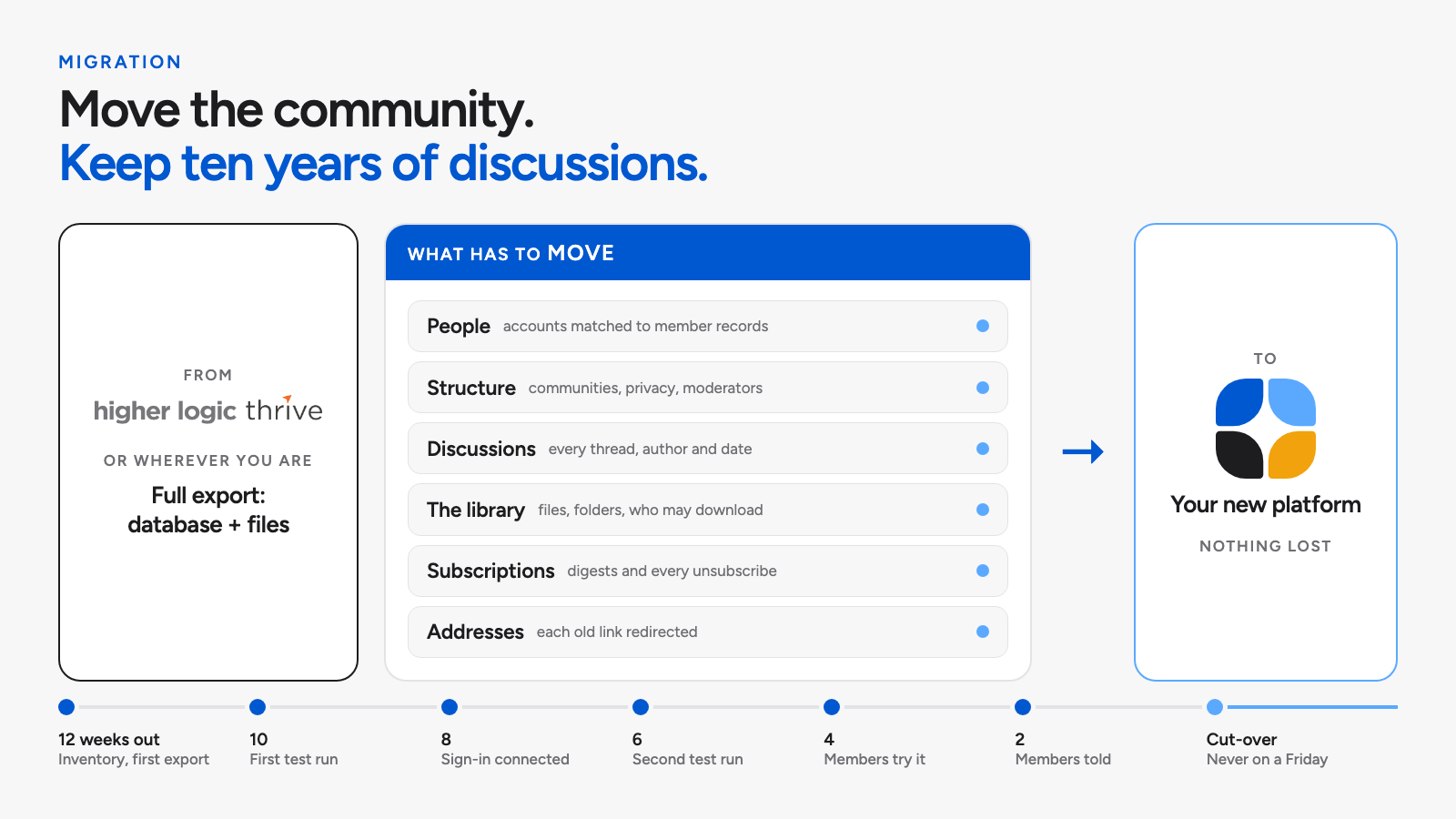
- People. Accounts, profiles, photos, and the link between each account and the member record in your AMS.
- Structure. Communities, their privacy settings, who belongs to each, and who moderates.
- Discussions. Every thread and reply, with its author, its date, and its attachments.
- The library. Files, their descriptions, the folders they sit in and who may download them.
- Events, blogs, announcements. Usually a small volume and often forgotten.
- Subscriptions. Who receives a daily digest, who receives every post, who has unsubscribed. Losing these is what generates complaints.
- Addresses. Every URL that another site, an old email or a search engine points at.
- Programmes. Mentoring matches, volunteer roles, anything with history.
Put a number beside each line: how many accounts, how many threads, how many files and how large. You will check against those numbers on launch day. A vendor cannot quote for a migration without them.
Who does what
A migration fails most often in the gaps between organisations, where each assumed the other had it. Settle this table at the start.
| Job | Usually done by |
|---|---|
| Requesting exports and giving notice | You: only the customer can ask the current vendor |
| Reading the export and moving the content | The new vendor |
| Deciding what moves and what does not | You: it is an editorial decision |
| Matching accounts to member records | The new vendor, with your membership team resolving the ones that do not match |
| Redirecting old addresses | Whoever controls your domain, which is often your own IT team or web agency |
| Connecting sign-in | The new vendor and whoever runs your AMS, together |
| Telling members | You |
| Checking the result | You. Never let the party that did the work be the only one that checks it |
The domain line is the one to settle first. If your community lives at an address the old vendor controls, find out now who can point it somewhere else, and how long that takes.
How to export your data from Higher Logic
You ask Higher Logic’s support team for a Full Community Data Export. It is delivered over SFTP as a SQL Server database backup plus zip archives of your files. The first one is free, and the files are deleted ten days after they are made available.
Higher Logic documents the process and policy. As that page stood when we read it in October 2026:
- You request it through a support case and list the content types you expect.
- It arrives as a SQL Server 2019 backup (a .bak file), plus zip archives of library and ideas files, over SFTP.
- The database covers contacts and profiles, community memberships and subscriptions, discussions and replies, blogs, Q&A, events and registrations, tags and permissions.
- Custom or non-standard content is excluded, and no diagram of the database is supplied.
- The first export is free. Each later one needs a new statement of work at a standard fee of $500, and is a full export, not just what changed.
- Data as CSV files is not part of this service.
- The files are available for ten days and then deleted.
Three practical consequences follow.
You need someone who can restore a SQL Server backup and find their way around it without a map. The backup opens in SQL Server Management Studio or the free SQL Server Express. Your new vendor should do this for you; ask them directly whether they have done it before.
You will want two exports. One early, to build and test the migration against real data, and one at the cut-over, to pick up everything posted in between. Plan for the second, and its $500, from the start.
Download immediately. Ten days is short if the person who requested the export is on holiday when it arrives.
Higher Logic also has a REST API that can read discussions, library documents and their attachments, which is useful for topping up between exports and for checking counts.
If you are leaving another platform, ask the same five things of its vendor before you plan anything: what form the export takes, what it leaves out, what it costs, how long the files are kept, and whether you can have more than one.
Decide what not to move
A migration is the one chance you will get to leave things behind. Sort every community and every large thread into four piles:
- Move as it is. Answered questions, reference threads, anything still read.
- Move and label. Old but useful. Mark its age so nobody takes 2016’s guidance for current.
- Archive. Keep a read-only copy for the record, out of members’ way.
- Leave behind, with a redirect. Dead communities and test posts. If the address has visitors or links, point it somewhere sensible.
Page views and the date of the last reply will make most of these decisions for you.
Keep every address working
Old links are in members’ bookmarks, in years of your own emails, on other organisations’ sites and in search engines. A broken link costs you traffic and, on the first day, members’ trust.
Google’s guidance for site moves is the standard to follow:
- Map each old URL to its new one and use permanent, server-side redirects.
- Redirect straight to the final address. Do not chain redirects.
- Keep the redirects for as long as you can, and at least a year.
- Submit the new sitemap and watch traffic on both old and new addresses afterwards.
For a community this means a table with one row for every discussion, library file and community page, giving its old address and its new one. Ask your new vendor to show you that table before launch, and test a sample by hand.
Then decide what happens to an address with no equivalent. A thread you chose to leave behind should land on the community it belonged to, or on search, with a line saying the discussion was archived. It should never land on a bare “page not found”.
Authorship is the thing to get right
A discussion moved without its author is a wall of text. Each post has to arrive attached to the right person, with its original date. Each person in turn has to be matched to their member record.
The reliable key is the member’s ID in your AMS, with email as the fallback. Three cases need a decision in advance:
- Former members. Keep their posts under their name, marked as a past member, or under “Former member”. Decide once and apply it everywhere.
- Duplicate accounts. People who joined twice with different emails. Merge them before the move.
- Anonymous posts. If your community allows them, make sure they stay anonymous on the other side.
Sign-in and subscriptions
Sign-in should not change for members. If they log in through your AMS or an identity provider today, the new platform should use the same one. The first visit is then a click and not a password reset. How that connection is made, and the three others an AMS integration can include, are in our guide to integrating a community with your AMS. Test this with real accounts of every member type, including a lapsed one.
Subscriptions are the commonest source of complaints. A member who chose a weekly digest and starts receiving every post will unsubscribe from everything. Carry each person’s choices across, including every unsubscribe. Send nothing in bulk until you have checked a sample.
What to check after each test run
Counting is not enough, because the totals can match while the content is wrong. After every test migration, check the same things.
| Check | How |
|---|---|
| Counts | Members, communities, threads, replies and files against the numbers in your inventory, less what you chose to leave |
| Authorship | Twenty threads picked at random: right author, right date, replies in the right order |
| Attachments | Open them. A file that is listed but will not download is the commonest silent failure |
| Formatting | Long posts with tables, images, quoted replies and links to other threads |
| Privacy | Sign in as a member with no special access and try to open every private community |
| Links inside posts | Members link to each other’s threads, and those links should arrive pointing at the new address |
| Subscriptions | Ten members’ settings, compared by hand with the old platform |
| Search | Search for the titles of five well-known threads |
Keep the list of what failed, and judge the second run against it.
How long a community migration takes
Plan about twelve weeks from the first export to cut-over, then four weeks of daily checks. That assumes one community platform, one membership system, and somebody who can make decisions about content each week. It looks like this:
| When | What happens |
|---|---|
| 12 weeks out | Inventory, first export requested, decisions on what not to move |
| 10 weeks out | First test migration into a private copy of the new platform |
| 8 weeks out | Sign-in connected; staff and moderators start using it |
| 6 weeks out | Address table complete; second test migration |
| 4 weeks out | A group of members invited to try it with real content |
| 2 weeks out | Members told the date, what changes and what does not |
| Cut-over | Old platform set to read-only, final export, final migration, redirects on |
| 4 weeks after | Daily checks on broken links, sign-in problems and email complaints |
Run the migration more than once before the real one. The first test always finds something: a content type nobody listed, attachments that did not come across, a community with the wrong privacy setting.
A go-live checklist for the week you launch
- Do not launch on a Friday.
- Set the old platform to read-only before the final export, so nothing is posted into the gap.
- Compare counts: members, communities, threads, replies, files. They should match what you decided to move.
- Open twenty old links from real emails and check where they land.
- Sign in as a member of each tier and confirm what each can and cannot see.
- Send yourself every kind of notification before any member receives one.
- Have something new waiting, such as a welcome post, a question from the chair or an event to register for. Members should arrive to a place that is alive.
- Tell members where to report a problem, and answer within the day.
Where migrations go wrong
- The second export was never budgeted. The test went well, then three months of new posts had no way across.
- Notice was given late. The old contract renewed for a year while the new one was being negotiated.
- Nobody owned the domain. Redirects were agreed and then waited weeks for someone who could change a DNS record.
- Everything was moved. Fifteen years of dead communities came across and buried the content worth finding.
- The first email went to everyone. Subscriptions were reset to a default, and the launch announcement was followed by a flood of notifications.
- It launched empty. Content was there but nothing was happening. Members who came once to look did not come back.
- The old platform was switched off on the day. Keep it, read-only, for at least a month, because somebody will need to check how something looked.
What to tell members, and when
Members need three messages, and each should fit on a phone screen.
- Two weeks before: the date, what will look different, and what will not change: their login, their posts, their email settings.
- On the day: one link, one thing to do first, and where to report a problem.
- A week after: what was fixed, with thanks to the people who reported it. This message earns trust and is the one most often skipped.
Tell your moderators and most active members a fortnight before everybody else, and let them in early. They will find the problems. On launch day they will be the ones answering other members’ questions.
What to ask the vendor you are moving to
- Have you migrated from our current platform before, and may we speak to that customer?
- Who does the work, you or us, and is it included in the price?
- How many test migrations are included?
- Will every old address redirect, and can we see the mapping?
- How are authorship, dates, attachments and subscriptions carried over?
- What happens to content you cannot move?
- What do you need from our current vendor, and by when?
At One Roof we treat the migration as part of getting started. We map what you have with you, move it, and have your team and a group of members use it with real content before anyone else is invited.
Questions about moving
How long does a community migration take?
About twelve weeks from the first data export to cut-over, followed by four weeks of daily checks. The first export and decisions about what to leave behind come in weeks one and two, a first test migration by week three, sign-in connected by week five, a second test by week seven, a group of members trying it by week nine, and members told the date two weeks before launch. It is longer if sign-in has to be built from nothing, or if nobody can say who controls the domain.
Does Higher Logic charge for a data export?
Not for the first. Higher Logic’s export policy says the first full export is free and each later one is $500 under a new statement of work. Every export is complete, not just what changed since the last, and arrives as a SQL Server 2019 backup with zip archives of files.
What does a community migration cost?
There is no single figure, but the lines are the same everywhere. Your current vendor may charge for exports after the first. Your new vendor may charge to read the export and move the content, or include it. Redirecting old addresses can need paid time from whoever runs your domain or website, and connecting sign-in can carry a fee from your AMS vendor. Your own staff also spend weeks deciding what to keep, matching accounts and checking the result. Ask each party for its figure in writing before you sign with any of them.
Will we lose our search rankings?
Expect them to move about for a few weeks. Google’s guidance on site moves says rankings can fluctuate while it recrawls a site that has changed address. They settle when every old address redirects permanently to its new one.
Can we move only the last few years?
Yes, and it is often the right decision. Decide by use and not by age: a thread from 2015 that is still read every week is worth more than last year’s that nobody opened.
Can members keep their passwords?
They should not need one. If the community signs members in through your AMS or identity provider, there is no community password to move. Where the old platform held its own passwords, they cannot be carried across, and members will set a new one on their first visit. Tell them so beforehand.
Should we run both platforms side by side for a while?
Not with both open for posting. Two live communities split the conversation and turn the second migration into a merge. Keep the old one read-only instead.