Events
How to run association webinars members attend
How to run association webinars: how many registrants attend, days, times and length, promotion and reminders, keeping people engaged, recordings, continuing education credit rules, pricing for members and non-members, and captions.
 Boopesh MahendranCo-founder, One Roof7 min read
Tap the picture to see it at full size.
In this article⌄
- How many registrants will attend
- When to hold it, and for how long
- Promote it, and remind people
- Keep people engaged
- Make the recording useful
- Check the rules for continuing education credit
- Price it for members and non-members
- Caption it
- What to measure
- Where One Roof helps
- Questions about association webinars
Webinars are a low-cost way for an association to teach, and members value them. Naylor’s 2026 benchmarking report surveyed 665 senior association professionals: 79% valued webinars as an engagement tool, close behind email, websites and e-newsletters. In Marketing General’s 2024 benchmarking report, 49% of associations said webinar attendance rose over the past year, and 12% said it fell.
This guide covers how many people attend, when to hold a webinar, promotion, keeping people engaged, recordings, continuing education credit, pricing and captions.
Most of the figures below come from companies that sell webinar software, using data from their own customers. They are not specific to associations, but they are the largest published data we found.
How many registrants will attend
Expect a third to a half to attend live:
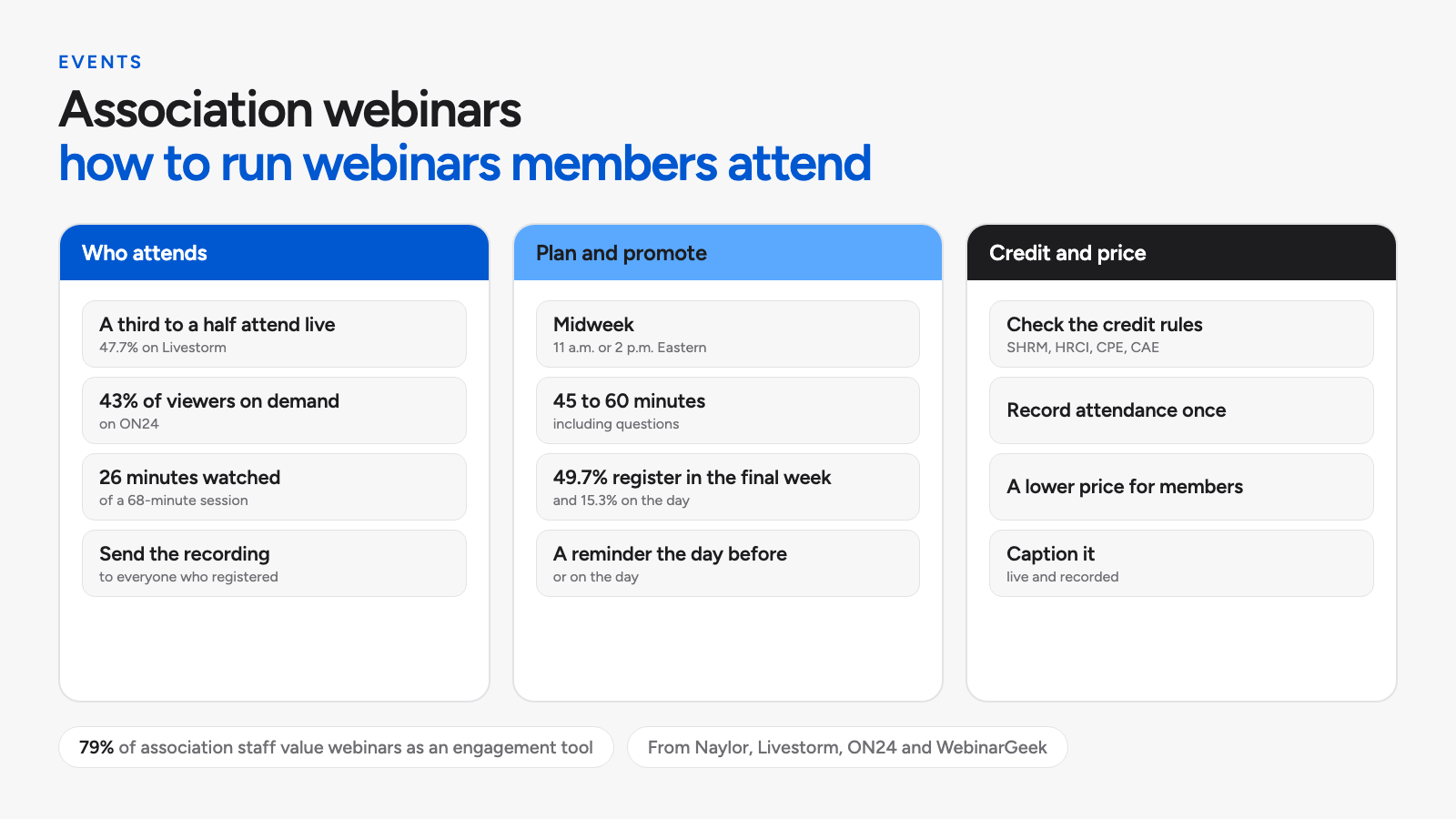
- On Livestorm, 47.7% of registrants attended live in 2025.
- On ON24, 60% of registrants watched, live or on demand, and 43% of those viewers watched on demand.
So the recording matters almost as much as the live session. Send it to everyone who registered, including those who did not come.
When to hold it, and for how long
From Livestorm’s 2025 data:
- Tuesday had the best show-up rate (51.7%) and Wednesday the biggest audiences. The gaps were small: Friday and the weekend were lowest, at 50.3%.
- July and August were weakest: 45% showed up in July, and 42.9% in August.
On timing, the advice differs a little. Livestorm’s team recommends 11 a.m. or 2 p.m. Eastern, from Monday to Wednesday, and says this is advice rather than a measured result. ON24 suggests 2 p.m. Eastern, on Tuesday, Wednesday or Thursday.
On length, Livestorm’s sessions averaged 68 minutes, but the average viewer watched 26 of them. Our advice:
- Aim for 45 to 60 minutes, including questions. WebinarGeek saw fewer sign-ups for webinars promoted as longer than 50 minutes.
- Put the most useful part first. Many people leave before the end.
Promote it, and remind people
People register late. On Livestorm, 49.7% of registrations came in the final week, and 15.3% on the day itself. Keep registration open until the webinar starts.
Email is the main channel: in Livestorm’s survey of B2B marketing teams, 86.3% named it among their top three sources of registrations. A simple plan, close to what WebinarGeek’s customers do:
- An invitation three weeks before, with a clear title that says what people will learn.
- A second invitation a week before, to those who have not registered.
- A reminder to those registered, the day before or on the day.
When the reminder goes out matters. In WebinarGeek’s 2025 report, based on 2024 webinars that were mostly B2B, attendance was highest (46%) when the reminder was sent between 24 hours and an hour before. It was 42% for earlier reminders, and 39% for reminders in the final hour.
Keep people engaged
On ON24, the average webinar drew 239 attendees, 14 questions and 150 poll responses. Some simple ways to keep people involved:
- Ask a poll question early, so people take part from the start.
- Change something often: a poll, a question, a new speaker.
- Leave time for questions, and answer the best ones from the chat.
- Have a second person watch the chat and pick out questions, so the speaker can keep going.
Make the recording useful
On ON24, the average webinar had more than 100 people watching on demand. To make the most of the recording:
- Send it quickly. ASAE makes its recordings available to members within 12 hours.
- Decide who can see it. On Livestorm, public recordings got 3.7 times as many views as those limited to registrants. Keeping recordings for members gives non-members a reason to join. Decide which matters more.
- Add the slides and links mentioned in the session.
Check the rules for continuing education credit
If members earn credit for attending, check your credential’s rules before you promise any. Some examples:
- SHRM awards 1 professional development credit per hour, in quarter-hour steps, for events of at least an hour. Its provider guide asks for a way to confirm that people took part in webinars.
- HRCI awards 1 credit per instructional hour. When submitting a webinar, a provider must describe how it records and monitors participation, and the program code can only be shared once someone completes it.
- Accountants’ CPE, under the 2026 standards, requires sponsors to monitor attendance at live online sessions. A participant’s own word that they attended is not enough. Automated attendance prompts, if used, must come “at least three times per 50-minute credit hour,” at unpredictable times. The rules apply to new programs from March 2027, and to existing ones by November 2028.
- ASAE gives no CAE credit for watching recordings of its own webinars. Only live attendance counts.
Record attendance once, from the webinar’s own report, and award the credit from that record. Our guide to continuing education credit tracking covers keeping those records.
Price it for members and non-members
Many associations price webinars differently for members and non-members. Some examples:
- ISACA: free for members, $75 for non-members.
- The Ambulatory Surgery Center Association (ASCA): included for member centers; non-members pay $179 a webinar, or $479 for an all-access pass to the 2026 series.
- The National Association of Mutual Insurance Companies (NAMIC): $90 a webinar for members and $140 for non-members.
- The Association of Oncology Social Work (AOSW): free for members and $54 for non-members, with continuing education credit $25 extra for both.
A lower price for members shows non-members what membership is worth. Our guide to membership recruitment covers turning those attendees into members.
Caption it
Captions help members who are deaf or hard of hearing, and anyone watching without sound. The W3C’s accessibility guidelines ask for captions on live video and on recordings. Many webinar platforms offer live captions, so check what yours can do.
What to measure
- Registrations, and the share who attended live.
- Views of the recording.
- How long people stayed, on average.
- Questions asked and poll responses.
- Credit issued.
- Non-members who registered, and how many later joined.
Where One Roof helps
With One Roof’s events, a webinar sits in the community your members already use:
- Set up an online event, with the joining link shown only to those registered.
- Members register in one click. Set a member price and a non-member price if you charge.
- Registered members get a reminder the day before, and are told if the time or the joining link changes.
- Mark who attended, once. Members marked as attended are awarded the event’s recertification credit.
- Afterwards, add the slides to the resource library, and post the recording link in a discussion, where members can ask follow-up questions.
For running the in-person and hybrid events around your webinars, see our guide to association event management.
Questions about association webinars
What is a good webinar attendance rate?
A third to a half of registrants attending live is typical. On Livestorm, 47.7% attended live. On ON24, 60% watched, live or on demand.
How long should an association webinar be?
We suggest 45 to 60 minutes, including questions. On Livestorm, the average viewer watched 26 minutes of a 68-minute session, so put the most useful part first.
What is the best day and time for a webinar?
Midweek, around 11 a.m. or 2 p.m. Eastern, is the usual advice. Livestorm suggests Monday to Wednesday, ON24 suggests Tuesday to Thursday, and July and August had the lowest show-up rates.
Should associations charge for webinars?
Many charge members less than non-members, or nothing at all. ISACA, for example, makes them free for members and $75 for non-members.
Do webinars count for continuing education credit?
They can, if the credentialing body’s rules are met. Most want a record of who took part. Some, like ASAE for its own webinars, give no credit for watching the recording.