Association newsletter ideas: what to include, and how often to send it
Association newsletter ideas: what to put in a member newsletter, how often associations send one, writing for readers who scan, subject lines, measuring clicks rather than opens, and the rules on unsubscribing and accessibility.
 Boopesh MahendranCo-founder, One Roof6 min read
Tap the picture to see it at full size.
In this article⌄
The member newsletter is still one of the main ways associations stay in touch with members. But it competes with everything else in their inbox. This guide covers what to put in it, how often to send it, how to write for people who scan, and how to tell whether it works.
Is a newsletter still worth it?
Association staff think so. Naylor’s 2026 benchmarking report surveyed 665 association professionals. The tools they valued most, and the share who valued each:
- Email: 83%.
- The association’s website: 81%.
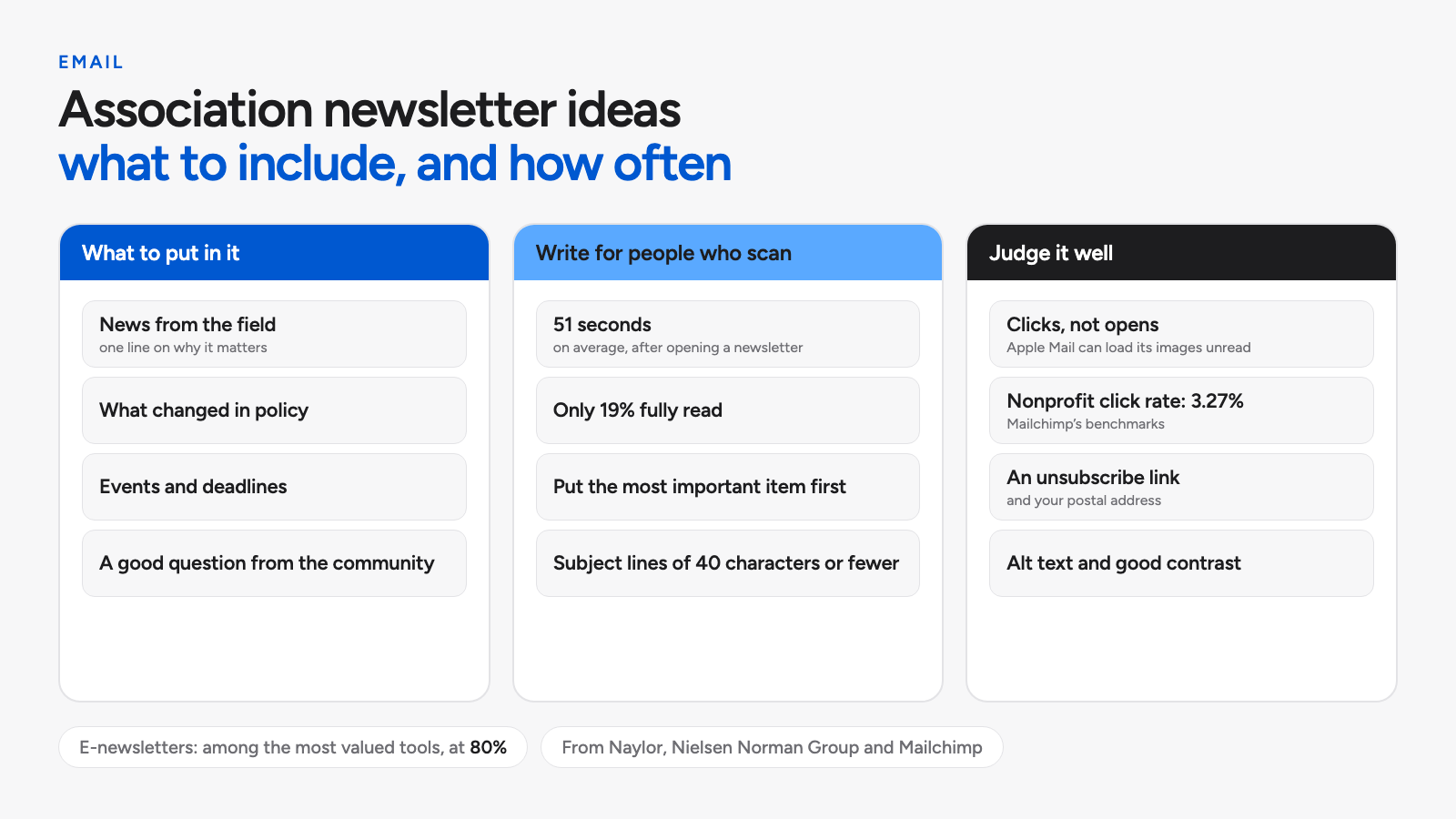
- E-newsletters: 80%.
- Webinars: 79%.
Print has not gone away either. In Naylor’s 2024 report, staff valued the printed member newsletter (43.2%) slightly more than the printed magazine or journal (42.8%). It was the first time the newsletter came top among print channels.
These figures come from association staff, not members. They show what staff believe works.
How often to send it
Members already hear from associations a lot. In Naylor’s 2024 report, associations reached members an average of 28 times a month, across print, digital, social media and video. About half of that was on social media. Asked what holds back member engagement (they could pick several):
- 53% said members suggest they are too busy.
- 48% said they do not target or segment their communications as well as they should.
- 21% said they communicate too often.
Some large associations with a news team send daily. For example:
- ASAE’s Associations Now Daily News arrives every weekday morning.
- SHRM’s HR Daily arrives each business morning.
- The American Medical Association sends Morning Rounds every weekday, and a Saturday edition with the best of the week.
Without a news team, a weekly or monthly issue is easier to fill with things worth reading. Choose a pace you can keep up with, and send it on the same day each time, so members know when to expect it.
What to put in it
Base it on why members join. In Marketing General’s 2024 benchmarking report, association staff named the top reasons they believe members join:
- Networking: 67%.
- Continuing education and certification: 42%.
- Specialized or current information: 32%.
- Best practices: 29%.
- Supporting advocacy: 27%, and 39% at trade associations.
Ideas that serve those reasons:
- News from the field. Three to five stories, each with one line on why it matters to members. The AMA’s Morning Rounds draws its stories from more than 3,000 major newspapers, magazines and journals.
- What changed in policy. New rules or laws, what the association is doing about them, and any action members can take.
- Something to learn. A short how-to, a checklist, or a new resource in the library.
- Events and deadlines. What is coming up, what carries continuing education credit, and when registration closes.
- People. A member spotlight, new members welcomed by name, a volunteer thanked.
- A good question from the community. A question one member asked and others answered, with a link to the discussion.
- Careers. New jobs on the job board, or salary data.
- Association news, briefly. Board decisions and changes to dues, kept short and linked.
Keep each item short: a headline, one line, and a link.
Write for people who scan
People do not read newsletters closely. In a 2006 Nielsen Norman Group study that tracked where readers looked:
- People spent an average of 51 seconds on a newsletter after opening it.
- They fully read only 19% of newsletters.
- 67% did not look at the introduction at all.
So:
- Put the most important item first.
- Drop the introduction. Two-thirds of readers in the study skipped it, though it averaged just three lines.
- Use headlines that say what the item is. “New state rules on pay transparency” works better than “Policy corner.”
Write subject lines that say what is inside
The Nielsen Norman Group advises putting the important words first and keeping a subject line to no more than 40 characters. It found that readers prefer subject lines that describe the content over ones that give the newsletter’s name or the month. Its example of a weak subject line: “April 2014 eNewsline.”
Compare “Member News, October” with “New CE rules, and 3 events this month.” The second tells members why to open it.
Judge it by clicks, not opens
Open rates are no longer a reliable measure. Apple Mail’s privacy protection downloads an email’s remote content, such as images, in the background, “regardless of whether you engage with the email.” So emails sent to Apple Mail users can count as opened when nobody read them.
Clicks show what members actually did. Mailchimp’s benchmarks, last updated in December 2023, give nonprofits an average click rate of 3.27%. Track which items get clicks over several issues, and give members more of those.
Follow the rules
- When it counts as marketing. If a newsletter’s main purpose is to promote a product or service, such as paid events or a sponsor’s offer, it counts as commercial email under US law. An issue that mixes news with promotion can count too, depending on its subject line and what comes first.
- Unsubscribing. The Federal Trade Commission’s CAN-SPAM guide says members “don’t lose their ability to opt out of marketing emails from you simply because they have a subscription or membership.” Include an unsubscribe link and your postal address, and honor opt-outs within 10 business days.
- Accessibility. The W3C’s accessibility guidelines were written for web content, but their basic rules carry over to email:
- Give every image a text alternative (alt text).
- Keep body text at a contrast of at least 4.5 to 1 against its background.
- Never rely on color alone to carry meaning.
- Write link text that says what the link does: “Register for the webinar,” not “Click here.”
Our guide to email deliverability covers keeping your newsletter out of spam folders.
What to measure
- Clicks per issue, and the share of recipients who clicked anything.
- Clicks by section, over several issues.
- Unsubscribes after each issue.
- Replies and forwards.
Where One Roof helps
One Roof’s email and notifications send members what is new in their community:
- Each member chooses a daily, weekly or monthly digest, or none.
- The digest holds what they have not yet seen from the spaces and topics they follow, and up to three discussions picked for them. No email goes out when there is nothing new.
- Send an announcement to all members, paying members, free members or the followers of one space, and see how many will receive it before you send.
- Members can reply to a discussion by email, once that is set up.
- Every email carries your logo and colors, and a link to change settings or stop all email in one click.
Questions about association newsletters
How often should an association send a newsletter?
As often as you have something worth reading. Some large associations with a news team send daily. Without one, weekly or monthly is easier to keep up and to fill well.
What should an association newsletter include?
News from the field, policy updates, something to learn, upcoming events and deadlines, member news, a good question from the community, and jobs. Keep each item to a headline, one line and a link.
Does a member newsletter need an unsubscribe link?
If its main purpose is to promote a product or service, it counts as commercial email under US law. The law requires, among other things, an unsubscribe link and a postal address. Including both in every newsletter is the safe choice.
What is a good open rate for an association newsletter?
Open rates are unreliable, because Apple Mail can load an email’s images without anyone reading it. Mailchimp’s nonprofit averages, last updated in December 2023, were 40% for opens and 3.27% for clicks. Track clicks instead.
How long should an association newsletter be?
Short enough to scan quickly. In a 2006 study, people spent an average of 51 seconds on a newsletter after opening it. A handful of short items, each with a link, suits that.