Email deliverability for associations: getting member email into the inbox
How associations get member email delivered: what Gmail, Yahoo and Outlook.com now require of bulk senders, SPF, DKIM and DMARC in plain words, five common mistakes, and what to measure instead of opens.
 Boopesh MahendranCo-founder, One Roof7 min read
Tap the picture to see it at full size.
In this article⌄
A renewal notice that lands in spam is a lapsed member you never got to talk to. Since 2024, Gmail, Yahoo and Outlook have had firm rules for anyone who sends a lot of email. Since 2025 they have turned away mail that breaks them. This guide covers what they require, the mistakes associations make most often, and what to watch.
What Gmail, Yahoo and Outlook require
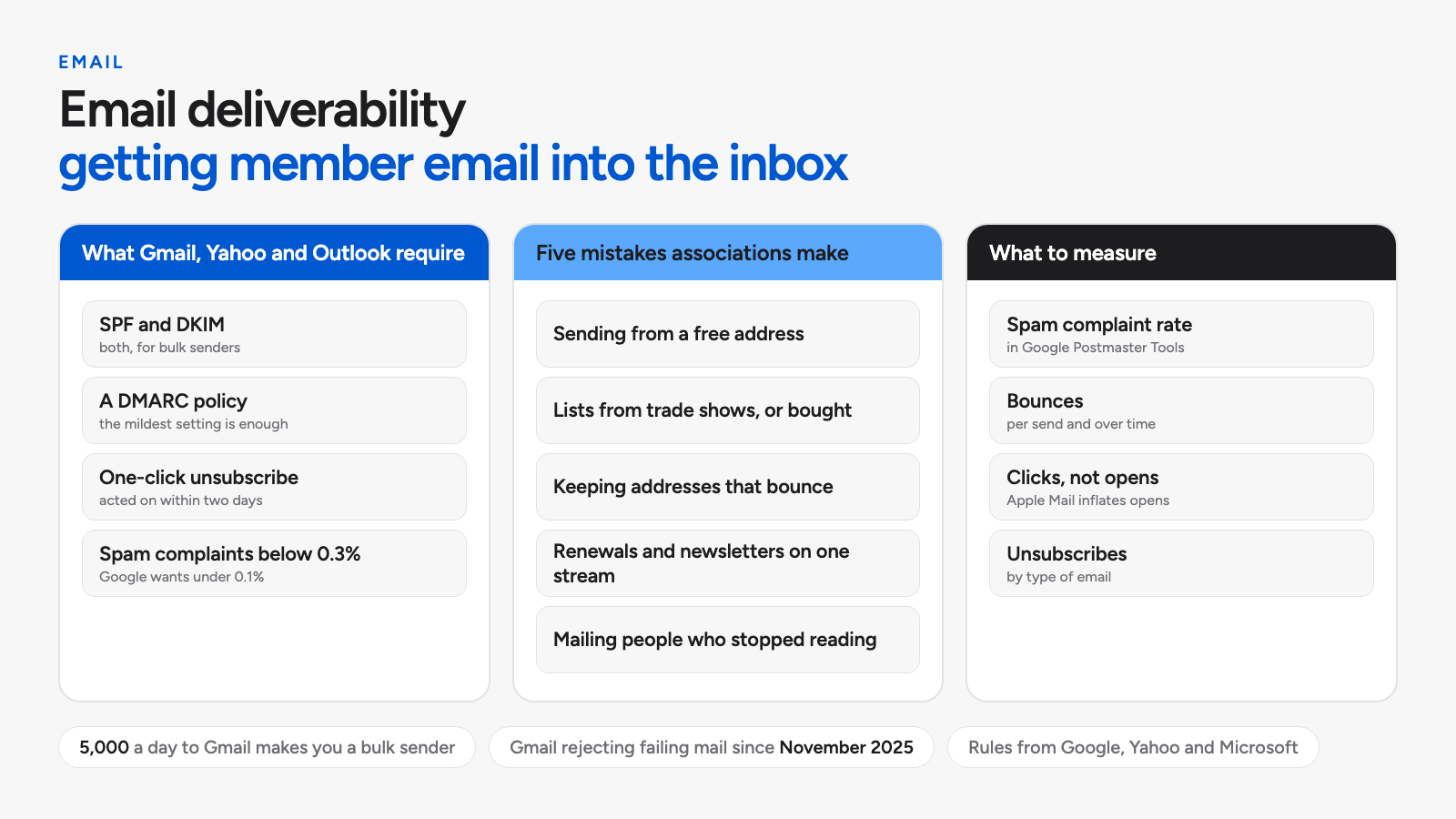
Google’s sender guidelines have extra rules for bulk senders: anyone sending close to 5,000 messages or more a day to personal Gmail accounts. Cross that line once and Google treats you as a bulk sender for good, its FAQ says. If half of your 10,000 members use Gmail, one newsletter to everyone is enough.
Bulk senders must:
- Authenticate their mail with both SPF and DKIM.
- Publish a DMARC policy. The mildest setting, which only asks for reports, is enough. Your From address must be on the domain you set up SPF or DKIM for.
- Offer a one-click unsubscribe in marketing email, and a visible unsubscribe link in the message. Act on it within two days: Google checks for 48 hours, and Yahoo requires two days.
- Keep spam complaints low. Google wants fewer than 1 in 1,000 messages reported as spam (0.1%), and never 3 in 1,000 (0.3%) or more.
Every sender, bulk or not, also needs a few technical settings, which your email provider usually handles: valid DNS records and an encrypted connection.
Yahoo’s rules are much the same. Microsoft’s, for Outlook.com, Hotmail and Live addresses, apply to domains sending more than 5,000 emails a day and ask for SPF, DKIM and DMARC.
These rules are now enforced. Microsoft has rejected mail that fails since May 2025. Google says that since November 2025, mail that fails its rules faces “temporary and permanent rejections.”
SPF, DKIM and DMARC in plain words
All three are records your IT team or email provider adds to your domain’s DNS:
- SPF lists the servers allowed to send email for your domain, so a receiver can check the sender is one of them (RFC 7208).
- DKIM signs each message, so a receiver can check it really came from your domain and was not changed on the way (RFC 6376).
- DMARC tells receivers what to do with mail that claims to be from your domain but fails those checks, and sends you reports about it (RFC 9989).
Every service that sends as your domain needs to be included: your email marketing tool, your AMS, your event platform, your community platform. One left out fails the checks.
To see whether a message passes, open it in Gmail and choose Show original. The header shows the result of each check.
Five mistakes associations make
Sending from a free address
Say a chapter leader sends the chapter newsletter through a newsletter tool, from their Yahoo or AOL address. It will be refused or sent to spam. Yahoo and AOL tell mailbox providers to reject mail that uses their addresses but comes from anywhere else. Google also says not to send as a Gmail address through other services. Send from a domain the association owns.
Lists from trade shows, or bought
Mailbox providers keep trap addresses: ones that never signed up for anything, or were abandoned long ago. Mail to a trap marks the sender as careless. M3AAWG, the industry’s anti-abuse group, names bought or rented lists, and lists of trade show participants, as common ways traps get onto a list. Google’s guidelines say plainly: “Don’t purchase email addresses from other companies.”
Email exhibitors and attendees about the event they signed up for, and ask before adding them to anything else.
Keeping addresses that bounce
A member who changes jobs leaves an address that no longer exists. M3AAWG’s sender best practices say to remove an address “if it bounces consecutively at least two times over two weeks or more.” Then ask the member for a new address the next time they log in or renew.
Renewals and newsletters on one stream
If a newsletter draws complaints, the same sender’s renewal notices and password resets suffer with it. M3AAWG recommends a separate subdomain for each purpose, such as one for news and offers and another for account mail. Ask your providers whether they keep the two apart.
Mailing people who stopped reading years ago
Mailbox providers watch whether people read your mail. An address nobody has used for a year or more can also be turned into a trap. Microsoft advises removing inactive or invalid addresses “monthly or quarterly.”
Send long-silent members one message asking whether they still want to hear from you, and stop if they do not answer.
Which emails count as marketing
Google’s one-click unsubscribe rule covers “marketing and promotional messages.” It says “transactional messages are excluded.” Renewal notices, receipts, password resets and event confirmations usually count as transactional, but a renewal email full of promotions may not. Newsletters and conference promotions are marketing.
The US CAN-SPAM Act draws a similar line: it looks at what a message is mainly for, not who sends it. Marketing email needs a valid postal address, and opt-outs must be acted on within 10 business days. Members do not have to opt in to your marketing email, the FTC’s compliance guide says, but they can still opt out.
What to measure
- Spam complaint rate, in Google Postmaster Tools, which is free once you verify your domain. It also shows whether your mail passes SPF, DKIM and DMARC.
- Bounces, per send and over time.
- Clicks, not opens. Apple Mail loads every email’s images in the background, whether or not anyone reads it, so opens are inflated. Google says low opens are not a reliable sign of poor delivery.
- Unsubscribes, by type of email, to find the messages members do not want.
For comparison, the average association email had a 2.68% click rate and a 33.54% open rate in 2025. That is from Higher Logic’s benchmark report, based on its data from about 1,500 associations and nonprofits.
Lists also lose people every year. In M+R’s benchmarks, 4% of nonprofit subscribers became unreachable through bounces in a year, and 12% unsubscribed.
A checklist
- Send from the association’s own domain, never a free address.
- Set up SPF and DKIM for every service that sends as that domain.
- Publish a DMARC record, starting with the mildest setting, and read its reports.
- Put a one-click unsubscribe in every marketing email, and act on it within two days.
- Keep account mail (renewals, receipts) apart from news and promotions.
- Remove addresses that bounce twice.
- Ask long-silent members once, then stop.
- Watch your spam rate in Postmaster Tools, and keep it under 0.1%.
Where One Roof helps
One Roof’s email and notifications follow these rules for the mail the community sends:
- Digests and announcements go out on a separate stream from one-to-one mail such as replies and receipts, so a complaint about a digest does not hold up anyone’s receipt.
- Digests and notification emails carry a one-click unsubscribe, in the message and in the headers mailbox providers read.
- An address that hard-bounces stops getting mail, and one that marks a message as spam stops getting that kind of mail, automatically.
- Each member chooses, for each kind of notification, whether it comes by email, in a digest or not at all, so they can turn off one kind of email without leaving everything.
- Staff see every email sent and whether it was delivered.
If your community has gone quiet as well, see our guide to reviving a quiet association community.
Questions about email deliverability
What is email deliverability?
Whether an email reaches the inbox, rather than the spam folder or nowhere. It depends on authentication, your sending reputation, and how recipients react to your mail.
Do the Gmail and Yahoo rules apply to small associations?
The authentication, DNS and spam-rate basics apply to every sender. The stricter rules (DMARC, one-click unsubscribe) apply to bulk senders, about 5,000 or more messages a day to Gmail. Meeting them all is the safest course at any size.
Why are our renewal emails going to spam?
The usual causes are a sending service missing from your SPF or DKIM records, sending from a free address, or renewals sharing a reputation with newsletters that draw complaints. Check a renewal message with Gmail’s Show original, and look at your spam rate in Postmaster Tools.
Should we remove inactive members from our email list?
Not from the membership, but consider stopping marketing email to addresses that have not clicked anything in a year or more. Ask them once first. Keep sending the account mail they need, such as renewal notices.
Do member newsletters need an unsubscribe link?
Yes, if they are marketing or promotional, under Google’s rules for bulk senders and under CAN-SPAM. Members can opt out of marketing email even though they do not need to opt in.