Member directory
An online member directory for your association: what to include, and who sees it
How to set up an online member directory for an association: public or members-only, a field template with who sees each field, consent and opt-outs, and stopping the directory being harvested.
 Boopesh MahendranCo-founder, One Roof8 min read
Tap the picture to see it at full size.
In this article⌄
A member directory is how members find each other: the person who has solved the problem you have, someone in your city, an expert to invite to speak. It is also a list of names, employers and contact details that marketers would like to copy. This guide covers what to put in a directory, who should see each part of it, and how to keep it from being harvested.
Why it matters
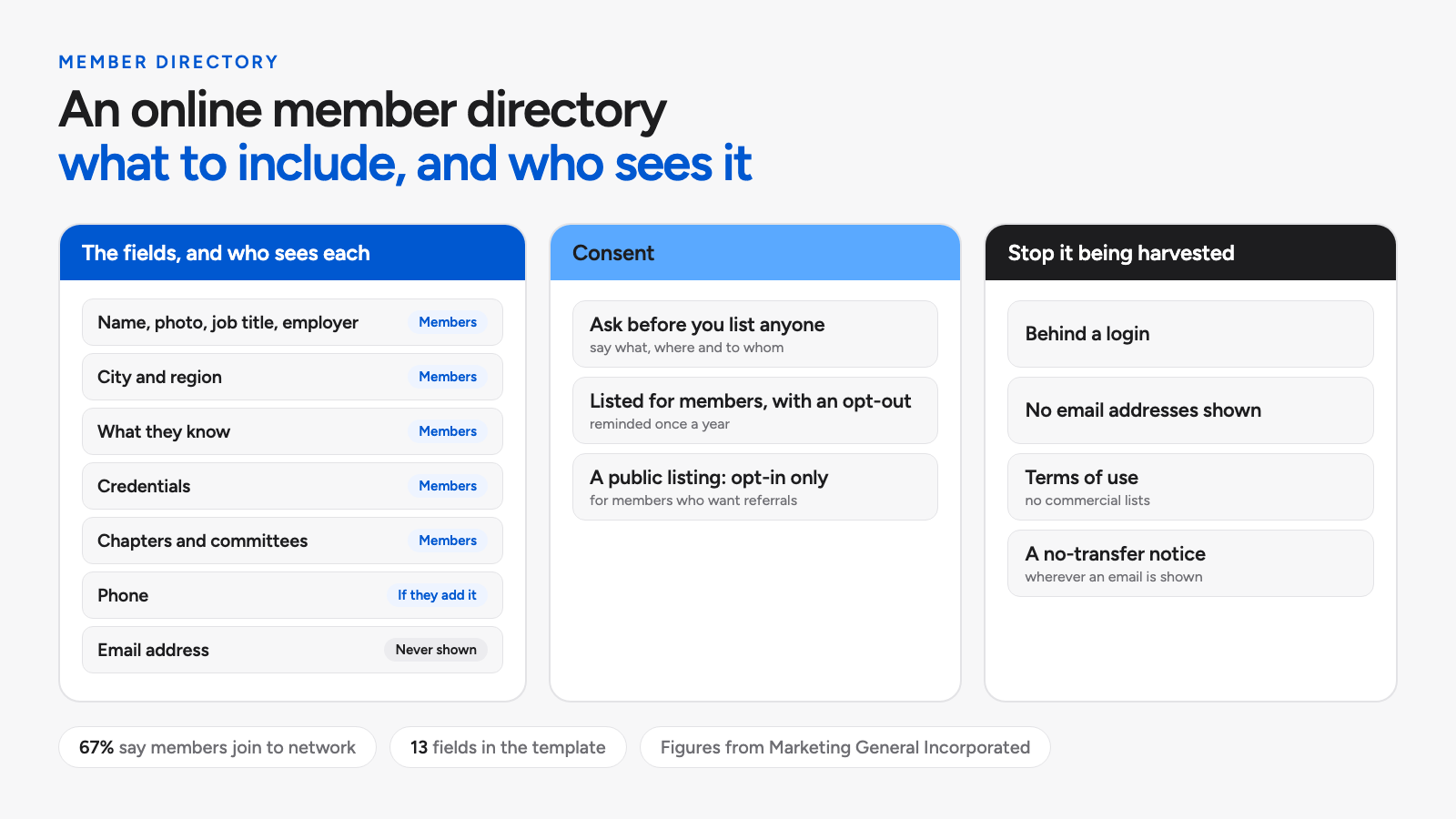
Associations say members join to meet each other. In Marketing General Incorporated’s 2024 benchmarking report, “members most often join an association to network with others in their chosen profession (67%, up from 64% reported in 2023).” Networking came first at individual-member, trade and combination associations alike. The next reasons were continuing education (42%) and specialized information (32%).
A directory is where that networking starts between events.
Public, members-only, or both
- Members-only. The full directory sits behind a login. The American Dental Hygienists’ Association’s directory works this way, with terms of use that limit it to members’ own use.
- Public, for finding a professional. Some associations list members for the public, usually only those who choose to be found. Only licensed APA members can create profiles in the American Psychological Association’s Psychologist Locator. ASHA ProFind lists ASHA-certified audiologists and speech-language pathologists “who have indicated they are accepting referrals”.
- Both. A short public listing for members who want clients or referrals, and a fuller directory for members only.
Most associations need the members-only directory first. Add a public listing only if members ask to be found by clients.
A field template
Each field below shows who sees it by default. Members can choose to show more or less of their own.
- Name: members. Public only if they opt into a public listing.
- Photo: members.
- Job title and employer: members.
- City and region: members. Never a street address.
- What they know (the subjects they can help with, in their own words): members.
- Credentials: members, and public in a public listing as proof of qualification.
- Industry or sector: members.
- Member since, and member type: members.
- Chapters and committees: members.
- Open to (mentoring, speaking, questions from newer members): members.
- Short bio: members.
- Phone: hidden unless the member adds it.
- Email address: never shown. Members contact each other through the community instead.
Staff can see everything, for running the association.
Consent and opting out
- Ask before you publish. The American Guild of Organists tells its chapters: “Before preparing any type of member directory (print or digital), chapter leaders need to obtain member consent.”
- Say exactly what, where and to whom. The same guidance: “A request for consent should list: what information will be published (be specific, mailing address, phone number, email address, etc.), where it will be published (online, printed), and who will be given access.”
- Remind members once a year, at renewal, that they can opt out. AGO also says parents of minors should opt in.
- Members in the UK. A members-only directory with an easy opt-out may rest on “legitimate interests” rather than consent. The UK Information Commissioner’s Office says that basis protects people best “when you combine it with clear privacy information and an upfront opportunity to opt out.” It expects a three-part test first. EU regulators may take a different view.
- In the US, California’s privacy law generally does not apply to nonprofit organizations, though some other states’ privacy laws do cover nonprofits. Members expect the same care either way.
A sensible default: ask when members join, list them in the members-only directory unless they opt out, and remind them at renewal. Nobody goes in a public listing unless they opt in.
Stop the directory being harvested
Directories are copied for sales lists. Commercial scraping tools are sold to pull chamber of commerce directories, for “B2B sales and lead-gen teams targeting local businesses”.
- Keep it behind a login.
- Do not show email addresses. A directory without them is a poor mailing list.
- Write terms of use. The Council on Foundations’ policy says: “The contents of the directory may not be used to generate mailing lists, e-mail lists, phone lists, or other lists for any commercial purposes.” ADHA’s prohibits use “for commercial or business purposes”.
- If any email addresses are shown, post a no-transfer notice. The US CAN-SPAM Act is harder on spam sent to harvested addresses. Sending unlawful commercial email to addresses copied automatically from a site with a notice that it will not give, sell or transfer them is an aggravated violation, with higher penalties. The FTC notes that “The law makes no exception for business-to-business email.”
Make it worth searching
- Search by what people know, not only by name. A member looking for help with pay transparency does not know whose name to type.
- Filter by place and specialty. AIA Colorado’s firm directory, Find an Architect, filters by location, type of project, firm size and designations.
- Ask for a photo. LinkedIn reported in 2017 that a profile photo brings “up to 21x more profile views and 9x more connection requests”. That is LinkedIn’s own figure, but the point carries.
- Keep it current. Fill names, employers and member types from your membership system, so members only add what it does not hold.
- Let members get in touch with a message, without either side’s address being shown.
Mistakes to avoid
- Publishing everything the membership system holds, home addresses included.
- Listing members without telling them.
- A public directory with email addresses. It will be harvested.
- Search by name only. Nobody comes to a directory to look up a name they already know.
- A directory nobody updates. Old employers and departed members make every result suspect.
How to measure it
- Share of members with a photo and at least one subject listed
- Directory searches a month, and searches that found nobody
- Messages and connection requests started from the directory
- Opt-outs, and the reasons members give
Where One Roof helps
One Roof includes a member directory as part of the member community:
-
Only signed-in members can see the directory, member profiles and the map.
-
Members can be searched by name, job title, employer or what they know, and filtered by region, industry or credential, as a grid, a list or a map.
-
Members list the subjects they know. A search for a subject finds the people who work on it, whether or not the word is in their job title.
-
Each member is shown a few people to meet, with the reason: a shared subject, the same region, or a different employer in the same sector.
-
Email addresses are not shown. Members contact each other by message, under the rule you set for who can message whom, and can block anyone.
-
Members choose whether they appear in the directory at all, and whether they appear on the map.
-
Once your membership system is connected, profiles start from what it holds, and members add their expertise.
Questions about member directories
What is an online member directory?
A searchable list of an association’s members, usually behind a login, that lets members find each other by name, employer, location or what they know.
What should a member directory include?
Name, photo, job title, employer, city or region, the subjects the member knows, credentials, member type, and chapters or committees. Leave out home addresses, and do not show email addresses.
Should a member directory be public?
Usually not. Keep the full directory for members, and offer a separate public listing only to members who want to be found by clients, as the APA’s Psychologist Locator does.
Do members have to opt in to a member directory?
Ask for consent, say what will be shown and to whom, and make opting out easy. A public listing should be opt-in.
How do you stop a member directory being scraped?
Keep it behind a login, do not show email addresses, and publish terms of use that ban using it for commercial lists. If any email addresses are shown, add a notice that they will not be given, sold or transferred.
How do you get members to complete their profiles?
Fill in what the membership system already holds, ask for a photo and a few subjects, and remind members to check their profile when they renew.